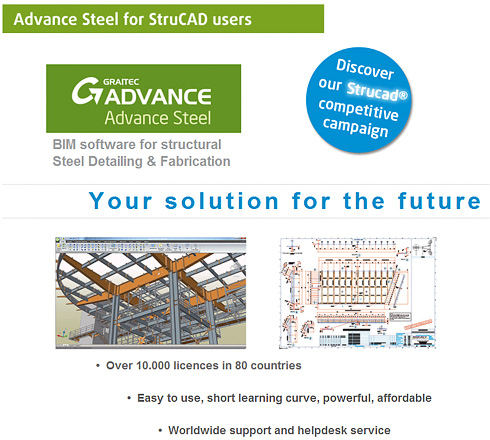
Advance Steel for StruCAD users


Advance Steel for StruCAD users

Advance Steel, the alternative solution to StruCAD

GRAITEC Products: CAD and Design Software for the Construction Industry

  • Proven track record with more than 10,000 seats worldwide: Trusted market confidence
  • Rapid adoption rate resulting in +50% growth in licenses in 2011: Tried and tested solution
  • Increased functionality / productivity: Tools for all market sectors: BIM, Structures, Off-shore, Bridges, Architectural, Sheet-metalwork,…
  • Works as a standalone application or with AutoCAD: Flexibility for users to choose platform to that suits them – no need to have AutoCAD
  • Low initial financial outlay: Best value system on the market
  • Lower on-going cost of ownership: Premium support & maintenance less than half the price of other systems
  • Easy to use and short learning curve: 5 day foundation training course; 3-days transition training from Strucad, includes full training manual
  • Quick and easy deployment: Set up company drawing borders in minutes
  • Interoperability: DSTV NC files in all versions, IFC, SDNF, CIS2, Graitec BIM, KISS, PSS, …
  • Support and Helpdesk service rated 98% excellent or good by our users: Dedicated team ready to help you by phone, email or remote assistance

Advance Steel 2012 videos

Advance Steel 2012 – Easy and efficient modelling tools
Advance Stel 2012 – Easy  and efficient modelling tools
Advance Steel is a complete 3D BIM steel detailing software providing automatic and user-friendly tools for creating the 3D model of your building in the best time.
From the creation of the portal frames to the generation of all cladding profiles, Advance Steel comes with numerous easy-to-use tools for purlins, side rails, automatic connections, stairs, railings and much more!
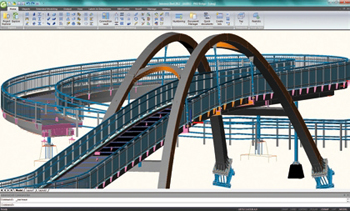
Advance Steel 2012 – Navigation through a 3D model
Advance Stel 2012 – Navigation through a 3D model
See how user-friendly and powerful Advance Steel 2012 is to navigate through a complex pedestrian bridge (model courtesy of PKD, Czech Republic).

Customer Projects

Advance Steel CIS/2 interface Advance Steel CIS/2 interface
Coke oven gas desulphurization done by
Hutni projekt Frydek-Mistek a.s with Advance Steel
New Valenciennes stadium done by
ETI with Advance Steel
Advance Steel CIS/2 interface Advance Steel CIS/2 interface
U2 “360° concert” stage done by
Stageco with Advance Steel
Steam cracking furnaces done by
Heurtey Petrochem with Advance Steel

GRAITEC will be exhibiting at NASCC 2012 in Dallas, Texas, April 18-20, 2012


March 22nd, 2012. GRAITEC is pleased to announce that the GRAITEC North American team will be exhibiting at NASCC, the steel conference in Dallas, Texas, on April 18-20, 2012 at booth #610.

The GRAITEC team will be demonstrating Advance Steel 2012, the powerful and user-friendly 3D structural steel detailing and fabrication software that automatically creates drawings, BOMs and NC files, and that communicates with Autodesk® Revit® among other systems.

Version 2012 of Advance Steel provides the user with the choice of CAD platform, AutoCAD or the GRAITEC CAD platform. The team will be demonstrating Advance Steel with both platforms at the NASCC.

GRAITEC will also be demonstrating Advance Design 2012, a superior solution for the structural analysis and design of Reinforced Concrete, Steel and Timber structures according to the latest versions of Eurocodes and North American codes.

During the NASCC, GRAITEC is offering

3 workshops on Thursday, April 19:

Partnership with ROBOBAT Morocco and roadshow in Casablanca


On March 2nd, GRAITEC and ROBOBAT Morocco organized in the seminar room of the “Le Royal Mansour Meridien” hotel in Casablanca (Morocco) a half-day presentationof the GRAITEC Advance BIM solution and particularly Advance Steel (BIM 3D steel detailing software).

Partnership with ROBOBAT Morocco and roadshow in Casablanca Partnership with ROBOBAT Morocco and roadshow in Casablanca

The half-day started with a presentation done by Mr.Soufiane SMAILI (Managing director of ROBOBAT Morocco) of the solutions and partnerships proposed by ROBOBAT Morocco on the Moroccan market.

This event provided the opportunity to announce the partnership between GRAITEC and ROBOBAT Morocco allowing ROBOBAT Morocco to promote and sell Advance Steel on its local market.

Mr. Francis GUILLEMARD (CEO founder of the GRAITEC group) then presented the GRAITEC group and its presence all over the world; he explained the strategic aspect of the partnership and the importance of the Moroccan market for GRAITEC.

Partnership with ROBOBAT Morocco and roadshow in Casablanca Partnership with ROBOBAT Morocco and roadshow in Casablanca

Mr. Babacar CISSE (Business Development Manager for Africa at GRAITEC) then detailed which partners have recently joined GRAITEC to promote the GRAITEC Advance solution on the African continent. Mr.CISSE insisted on the importance to have local motivated and well-trained partners allowing support and proximity assistance.

Partnership with ROBOBAT Morocco and roadshow in Casablanca Partnership with ROBOBAT Morocco and roadshow in Casablanca

The Advance Steel software was demonstrated in detail by Mr. Philippe BONNEAU (Advance Steel Marketing Product Manager) with a “live” presentation of the new release of Advance Steel 2012, an explanation of the benefits and advantages provided to the user and also a focus on the interoperability with the other solutions present on the market (e.g. the successful import of a model from the analysis Robot software into Advance Steel).

Partnership with ROBOBAT Morocco and roadshow in Casablanca Partnership with ROBOBAT Morocco and roadshow in Casablanca

This seminar was a great success with more than 90 Moroccan engineering offices and construction companies, and gave the opportunity of different exchanges during brunch.

Mr. Babacar CISSE comments: “In the direct continuation of the geographical expansion of the solutions developed by the GRAITEC Group, Morocco is part our strategy and we are very happy to welcome ROBOBAT Morocco in our distribution channel of partners.

The versatility of Advance Steel can help you realize projects out of the ordinary!


With Advance Steel, our users can create amazing projects.  Our American users understand this and have created incredible structures with it.  Tuckerman Steel Fabricators Inc. were able to harness the power of Advance Steel to create their latest project, something special that was launched on 11/11/2011 and captured on video.  Check it out at Boston Tea Party Ships and Museum-Launching 11 11 2011!

The project shown is a steel barge supporting a 3 story building consisting of shops, a museum, and restaurants, including ballast compartments, stair wells, elevator compartments, watertight doors, gangway support platforms and pile guides. The barge had to be pre-fabricated in panels – deck panels, bottom panels, bulkheads, side panels, and very often panels that included over 150 parts. Accordingly to Ilko Dimitrov, Project Manager at Tuckerman Steel Fabricators Inc., Advance Steel increased the productivity and the accuracy of the drawings: “The software was very helpful in detailing the panel drawings and all the interior framing and stairs as well”.

Also, the designers of the barge noticed that Advance Steel is very well designed to optimize drawing layout by eliminating empty spaces between members, and has the option to create running dimensions from left to right and vice versa, and the option to switch between absolute and relative or both types of dimensions. The scaling of objects is very easy. Placing labels, part marks, material type and basically all necessary information is very handy. Creating and updating BOM is fast and accurate.

Tuckerman Steel Fabricators, Inc. based in Boston, MA is incredibly proud of the results obtained with Advance Steel.  The week after they were trained on Advance Steel they were able to model and detail the entire barge.  They were able to meet their fabrication and shipping deadlines without any errors!

This slideshow requires JavaScript.

GRAITEC launches its Czech website


AB Studio is pleased to announce the launch of the new Czech GRAITEC website, thus making the Advance  suite, but also CADKON and TREPCAD, available to engineers and structural draftsmen in Czech Republic and Slovakia.

While looking for comprehensive and easy to use detailing software solutions, consider CADKON (link to http://www.graitec.cz/cadkon.html), a convenient and powerful tool with simple controls, specifically designed for creating advanced construction drawings, and now can be run as a standalone application.

The website provides information on the GRAITEC ADVANCE suite, with its many new features and improvements included in the 2012 versions, with special focus on the Czech version of Advance Design (http://www.graitec.cz/produkty-advance/advance-design.html) and the fact that starting from the latest version, Advance Steel (http://www.graitec.cz/produkty-advance/advance-steel.html) breaks free from AutoCAD.

Another novelty for Czech users is the Czech version of TREPCAD, a dedicated and comprehensive stair modeling and detailing software that will be available to Czech customers in March, 2012.

The website also includes a customer reference section (link to http://www.graitec.cz/reference/), where there is information about our clients remarkable designs – the most elaborate projects made with ADVANCE or CADKON software solutions can be viewed.

AB Studio, a part of the international GRAITEC Group and one of the largest suppliers of CAD / CAE solutions in the Czech Republic, invites you to visit us at www.graitec.cz!

This slideshow requires JavaScript.

Another success story: customer in Canada thrilled to work with Advance Steel


A recognized and expanding company in the manufacturing of steel structures and wrought metals situated in Quebec (Canada), Pro-Mec Elite Inc., has chosen GRAITEC Advance Steel 2012 as its steel detailing software.

Pro-Mec Elite Inc. was using AutoCAD and Inventor so far to do all their studies. They recently decided to move to a 3D BIM solution in order to gain productivity with their drill-line from Ficep and analyzed all software available on the market.

After an extensive review of several software packages such as TEKLA Structures, SDS/2, and StruCAD, they found that Advance Steel is much easier to use and with the advantage to be based on AutoCAD.

GRAITEC Inc. had different meetings with Pro-Mec Elite Inc to answer their expectation and demonstrate that Advance Steel is the right solution for the type of structures they are daily doing.

Therefore Pro-Mec Elite Inc. decided to purchase 2 seats of Advance Steel (with the potential to acquire 4 additional licenses as 6 detailers are working the company) and followed the training 2 weeks ago in the office of GRAITEC Inc (Montreal).

Already, after only 1 week using Advance Steel, they noticed a significant time gain in the realization of drawings and are very satisfied with the software and customer service at GRAITEC.

More information on Pro-Mec Elite Inc. website: http://www.promecelite.com/news/purchase-of-graitec-advance-steel_12

This slideshow requires JavaScript.

Advance Steel 2012: CAD platform freedom


Advance Steel® is specifically designed for steel professionals who require an easy-to-use 3D structural steel detailing software for automating drawing production.


 Choice of graphical platform and improved ergonomics 

Historically based on the AutoCAD® platform, Advance Steel 2012 allows users to use their software with or without AutoCAD®. In fact, the product includes its own graphics engine, and the user can select the desired CAD platform. Regardless of the selected platform, all the essential functionality of the software is retained, as well as DWG® compatibility.

This major change has also allowed GRAITEC to simplify the user interface by focusing on and organizing the industry specific functionality of the software and the BIM integration. A “BIM Center” facilitating data exchange is available.

Another major impact for the user: the overall cost of the solution and the ease of installation and deployment. The return on investment of Version 2012 is improved by 30%.

Advance Steel 2012: Choice of graphical platform and improved ergonomics


 New automatic controls for 3D modeling 

Version 2012 also has many other improvements, the main ones are as follows:

  • Management of a preliminary reference mark to improve the traceability of elements from their creation to manufacturing
  • Option to group similar connections to manage and change them in a single operation
  • Implementation of new automatic connections (e.g., turnbuckle bracings, purlin connections with sleeves, connections between steel and concrete elements)
  • All new connections work on standard and cold rolled profiles
  • Numerous modifications in the existing connections, including in the field of metalwork.
Advance Steel 2012: New automatic controls for 3D modeling


 Extensive libraries 
Advance Steel 2012 provides libraries with lots of new and updated profiles and bolts:

  • Cold rolled profiles ( Joris IDE, Kingspan, etc.)
  • Cladding sections (Perfitec, Metecno, Corus, etc.)
  • Bolts and connectors (Lindapter, Australian bolts, etc.)


 Enhancements for high quality drawings 
Following on from previous versions, Advance Steel 2012 continues to improve the overall quality of drawings created automatically by the software:

  • Several new drawing styles delivered and ready to be used
  • Lists on drawings can be customized to include formulas (e.g. elements weight + 5%)
These new options increase user productivity and protects the production and management of documentation of their steel construction projects.

Successful Advance Steel User meeting in Netherlands


A user meeting was organized by MATRIX Software, the GRAITEC reseller of Advance Steel in Netherlands on the 29th November for the users from Netherlands and the Flemish-speaking area of Belgium. More than 50 end-users were present at this event which took place in Gorinchem (Netherlands).

The companies Stageco&Breetec explained in details how they successfully used Advance Steel to model in 3D the impressive stage of the U2 Tour.

Matrix software finished the meeting with the presentation of prizes for the 3 best projects in their 2011 Advance Steel User competition.

Marc Verstraten (from Breetec company), winner of the first prize in the 2011 user contest, explains: “Advance Steel was the right software solution to handle the type of complex project for the conveyor for Arcelor-Mittal, and although the project did not use a lot of the standard connections from Advance Steel, it still was possible to create the complete model with Advance Steel objects. As more than 50% of the project consists of folded plates we were especially satisfied with the Advance Steel bending and unfolding capabilities, plus also the drawings that Advance Steel produced more than met the accuracy requirements for this type of construction.
We are very proud to win the first prize in the 2011 user contest. It confirms that smaller companies can produce complicated designs and thereby acurately achieve the higher level of complexity required in so many modern design. We will keep improving our skills with Advance Steel by pushing ourselves and the program further to the limit. 

This slideshow requires JavaScript.

Service Pack 2 of Advance Steel 2011 is released!


Service Pack 2 of Advance Steel 2011 comes with a set of corrections and enhancements and provides the following advantages to end-users:

Advance Steel: Professional Steel Detailing Software Solution for AutoCAD

  • More efficient modeling: Service Pack 2 brings a powerful set of enhancements with various automated and parametric connections provided by default within Advance Steel. Such enhancements help users to model their 3D models faster. Enhanced update of all documents
  • Enhanced update of all documents:  As a core functionality of Advance Steel, a modification in the 3D model automatically updates all documents affected by the modification. Service Pack 2 improves the management of user modifications done directly on the drawings before the automatic update completes. Productivity and drawing consistency are consequently improved.
  • Better collaboration: Advance Steel delivers the highest level of communication with other solutions in a BIM environment. Service Pack 2 extends possibilities of BIM exchange thanks to a set of new formats requested by our worldwide community of users.

Any customer under maintenance contract can download Service Pack 2 from the GRAITEC Advantage web site: www.graitec.com/advantage

Advance Steel 2011 compliant with AVEVA PDMS


GRAITEC announces the compliancy of Advance Steel with AVEVA PDMS. This technology partnership will allow interoperability between the two software products and will increase productivity of engineers by offering an integrated solution from design to fabrication.

Advance Steel 2011 compliant with AVEVA PDMS

Advance Steel 2011 successfully completed the validation and testing with AVEVA PDMS through AVEVA’s OpenSteel interface. OpenSteel supports tightly integrated 2-way exchange of intelligent data with Advance Steel that includes modification and updating of the PDMS model. The combined solution reduces design time, rework and project cost by streamlining collaboration between 3D plant layout and steelwork detailing.

Part of the GRAITEC Advance BIM solution, Advance Steel is specifically designed for structural engineers and steel detailers who require professional and easy-to-use BIM software dedicated to structural detailing , miscellaneous steel modeling and automatic creation of drawings, BOMs and NC files. Advance Steel drastically increases productivity and drawing quality, while reducing the risk of errors.

AVEVA PDMS is the most powerful and productive 3D plant design software available, PDMS is the solution of choice in most of the world’s power and plant industries. It supports projects of all sizes, from the smallest upgrade to new-build installations of unlimited complexity, and offers valuable collaboration opportunities and an extensive pool of skilled users.

AVEVA PDMS                 Advance Steel 2011

Advance Steel 2011 compliant with AVEVA PDMSAdvance Steel 2011 compliant with AVEVA PDMS

Example of a pylon model shared between AVEVA PDMS and Advance Steel 2011.

For Paul Cooper, VP Partnerships and Strategic Alliances at AVEVA: “This agreement demonstrates AVEVA’s continued commitment to interoperability. The AVEVA OpenSteel interface has been developed to enable effective integration between PDMS and 3rd party steel detailing applications and we are delighted to welcome GRAITEC into our global partner network.

For Manuel Liedot, Chief Technical Officer at GRAITEC SA: “The main benefits of this AVEVA PDMS / Advance Steel compliancy is the ability to identify and avoid collisions (e.g., identifying ductwork running into structural members or railings), and the creation of an interactive and complete 3D model which can produce detailed drawings for accurate fabrication and construction of the project.

Graitec Advance suite compliant with Autodesk Revit 2012


GRAITEC Advance compliancy with REVIT 2012GRAITEC Advance compliancy with REVIT 2012GRAITEC announces the compliancy of its Structural BIM solution suite, GRAITEC Advance, with Autodesk Revit® 2012.

Specifically designed for engineering firms, design offices, detailers and draftsmen, the GRAITEC Advance suite consists of Advance DesignAdvance Concrete and Advance Steel. It provides a complete environment for designing, detailing and creating all design and fabrication documents for reinforced concrete, steel and timber structures.

In an environment where designers are subjected to increasing pressure for optimizing material and costs, reducing the design time, controlling the risks of implementation and integration of new constraints, particularly related to the environment, the response of software developers, particularly of GRAITEC, must be innovative and efficient.

As an important player of digital modeling in the field of construction, GRAITEC continues to enhance its modeling and automation tools based around the digital model, now commonly known as BIM (Building Information Modeling). This technology associates each real object to its virtual equivalent in the digital model, and thus opens the possibility for users to simulate the behavior of the real structure and automate many processes. It also allows the different players to exchange digital information, improving the traceability of information and reduce the design risks. This leads to the compatibility of Advance with Autodesk Revit® 2012.

This integration allows users of Autodesk Revit Architecture® 2012 and Autodesk Revit Structure® 2012 quickly optimize the design of their structures in accordance with U.S. standards and Eurocodes and to produce effective and error-free general arrangement drawings for reinforced concrete in addition to all fabrication drawings, BOMs, and NC files for steel construction. It also reduces the potential risk of errors with changes during the project.

According to Manuel Liedot, GRAITEC Group Product Manager: “This integration makes the work of our users easier. It allows them to automate the design, calculation, and creation of fabrication documents using data from architects or engineering firms using Revit tools.

GRAITEC Advance compliancy with REVIT 2012

Model of mixed Concrete-Steel structure imported from Revit Structure 2012 into GRAITEC Advance

GRAITEC Advance compliancy with REVIT 2012

Model of mixed Concrete-Steel structure in Revit Structure 2012

Convert a reinforcement cage to 3D solids and export it to a dwf file


Advance Concrete provides the option to get a single “dwf” file which contains reinforcement elements and the structural model. This file is necessary for importing the structural model into other software like “Autodesk Navisworks“.
The “dwf” file can be created by following two steps:

How is a reinforcement cage with or without formwork converted to 3D solids and exported to a dwf file?

For this example, consider that some structural reinforcements were reinforced using some dynamic solutions.
The first step is to create a file that contains reinforcement bars as ACIS 3D solids.

First, select all the existing entities. These elements can be selected using the “Select by type” option, found on Advance Concrete‘s Pilot. The entities can also be selected by using AutoCAD®’s “Quick select” tool, or by using Ctrl+A.

How is a reinforcement cage with or without formwork converted to 3D solids and exported to a dwf file?

How is a reinforcement cage with or without formwork converted to 3D solids and exported to a dwf file?

After all the elements are selected use the “Start 3D viewer” function on the “Advance reinforcement 3D viewer” toolbar.

How is a reinforcement cage with or without formwork converted to 3D solids and exported to a dwf file?

If the model is not completely reinforced (some structural elements are missing reinforcement), Advance Concrete displays a warning message.

How is a reinforcement cage with or without formwork converted to 3D solids and exported to a dwf file?

Using the 3D viewer dialog window, select the third option “Export to DWG file with 3D solids“.

How is a reinforcement cage with or without formwork converted to 3D solids and exported to a dwf file?

If the newly created file is opened in pure AutoCAD®, we will see that the structural elements are made only from simple AutoCAD® lines, while only the reinforcement bars are 3D solids.

The second step is to convert the structural elements into 3D solids and copy them over the elements from the drawing created using the “3D Viewer” function.
To convert all the structural elements into AutoCAD® solids, select the entities and use the “Convert a structural element into ACIS solid entity” function, on the “Advance Model” toolbar.

How is a reinforcement cage with or without formwork converted to 3D solids and exported to a dwf file?

This function also provides the option to keep or erase the original structural elements.

How is a reinforcement cage with or without formwork converted to 3D solids and exported to a dwf file?

After using this option, copy all the ACIS solids by picking a base point. With the help of the base point the AutoCAD® solids will perfectly overlap the reinforcement entities that were obtained in step 1.

How is a reinforcement cage with or without formwork converted to 3D solids and exported to a dwf file?

Paste the elements in the step 1 drawing by choosing the same base point.
Using the “Quick select” tool select all the AutoCAD® simple lines and delete them.

How is a reinforcement cage with or without formwork converted to 3D solids and exported to a dwf file?

In the end, a drawing is obtained which contains only AutoCAD® 3D solids. This drawing can be exported as a “dwf” file, and imported in other software like “Autodesk Navisworks“.

How is a reinforcement cage with or without formwork converted to 3D solids and exported to a dwf file?

Advance Design Service Pack 1


Advance Design® BIM system is dedicated to structural engineers who require a comprehensive solution for simulating and optimizing all their projects. It includes: a user-friendly structural modeler, automatic load and combination generators, a powerful FEM analysis engine (static, dynamic, time history, non linear, buckling, large displacement analysis, etc.), comprehensive wizards for designing concrete and steel members according to Eurocodes, efficient result post-processing and automatic report generators.

Service Pack 1 of Advance Design 2011 has been released and includes many corrections and enhancements for the implementation of the Eurocodes:

 Eurocode 1 

Improvements to combination management: option to group several load cases, Psi coefficients in the property list of families, option to define several live load types in the same model…

Advance Design 2011 Service Pack 1

More detailed clause references in the “Description of climatic loads” report:

Advance Design 2011 Service Pack 1

The “exceptional snow fall” field is now automatically activated when set on A2, B1, B2, C2 and D snow areas (see 1.1 (3) from French National Annex) (Ref. 11381).

Advance Design 2011 Service Pack 1

 Eurocode 2 

Improvement: ADVANCE Design can return values for both concrete stresses and steel stresses.

Advance Design 2011 Service Pack 1

A new option has also been added in order to compute stresses according to French “Recommandations professionnelles”:

Advance Design 2011 Service Pack 1

When activated, ADVANCE Design will use the same αe value for the three SLS combinations (characteristic, frequent, quasi-permanent):

Advance Design 2011 Service Pack 1

A new field, “Equivalent diameter Φeq”, has been added in the concrete properties of linear and planar elements.

Advance Design 2011 Service Pack 1

After the calculation, the values for Sr,max, ξsm-ξcm or wk can be displayed.

Advance Design 2011 Service Pack 1

The crack width is calculated taking into account the theoretical reinforcement value for the reinforcement ratio calculation. In the Advance Design 2012 release this feature will be improved with the option to define the reinforcement bars on linear and planar elements.

Improvement: The Young’s modulus for concrete materials is computed with the formula from EN1992-1-1 (Ref. 11617).

Advance Design 2011 Service Pack 1

The High End Steel Detailing Solution used in the construction industry in Turkey


In October 2011, ÇEKA Ltd, a market leader in steel formworks, has chosen to use GRAITEC Advance Steel. By using GRAITEC solution for modeling and detailing the steel structures since version 7.1, ÇEKA decided to speed up the time allocated to its projects with the new integrated intelligent functionalities. Thus, the engineers feature the Multi-User solution, which allows them to work simultaneously on the same project by assuring a secure data transfer between all 10 working stations. 

GRAITEC Advance Steel - The High End Detailing Solution used in the formwork construction industry by ÇEKA Ltd. in Turkey

Zerrin Kutay, Vice President of ÇEKA Ltd.: “The market demands more and more complex formworks and faster than before. Engineering design is a critical step in our production process and Advance Steel has been an integral part of our success since we first started using 5 years ago on a limited scale. We have now decided to extend the Advance Steel to all levels of engineering design and we are confident in Advance Steel’s continuing contribution to our success in capturing market growth.”

Ionel DRAGU, General Manager of GRAITEC Romania : “We are strongly confident about this cooperation with ÇEKA, which certainly will be the first step to our extension in the Turkish market. Moreover, we will be glad to share the success stories of ÇEKA, due to the use of Advance Steel.”

GRAITEC Advance Steel - The High End Detailing Solution used in the formwork construction industry by ÇEKA Ltd. in Turkey

About ÇEKA: 
In Turkey, the year 1976 in which ÇEKA has been established, the construction industry was not acquainted with the industrial formworks. In those years, limited number of companies which were in search of new technologies had worked with ÇEKA. 
Since then, ÇEKA is serving the growing demand by increasing the production capacity and introducing newer technologies in design & productions as well as complementary services like the sub-contracting, steel formwork rental services, along with offering products of the firms that ÇEKA represents. Within the range of limited firms, which use their own patent, technology and design, ÇEKA dwells on the design and production of more practical and more economical formworks. ÇEKA formworks, the result of 30 years of construction site experience, are designed within TS, DIN and ACI norms and been used by the constructors in Turkey and abroad. 
For more information, visit: www.ce-ka.com.tr 

Service Pack 1 of Advance Steel 2011


Service Pack 1 of Advance Steel 2011 provides the following to end-users:

• Compliancy of Advance Steel 2011 with AutoCAD® 2012
• Various enhancements

 SP1 makes Advance Steel 2011 compliant with AutoCAD® 2012 and AutoCAD Architecture® 2012 

Advance Steel - Compliancy with AutoCAD® 2012 and Autodesk® Architecture 2012


AutoCAD® 2012 enables the quick creation of documents from a variety of modeling formats, helping to reduce manual documentation workarounds. Capture and import as-built information to jump-start your design process. Plus, you’ll find a wide range of timesaving enhancements to the features you use most. AutoCAD® 2012 delivers the powerful tools you need to participate in smooth 3D design workflows, helping drive your projects to completion more quickly than ever before.
Advance Steel - Compliancy with AutoCAD® 2012 and Autodesk® Architecture 2012
With new and expanded workflows for 3D conceptual design, model documentation, and reality capture, AutoCAD® 2012 helps design professionals maximize productivity.
To get AutoCAD® 2012 compliancy, Advance Steel users can download Service Pack 1 from the GRAITEC website:www.graitec.com/advantage

 Service Pack 1 has different enhancements such as: 

  Shim plates in base plate joints can be created with or without a leveling plate.

Shim plates in base plate joints can be created with or without a leveling plate

  New option to define the front/view of profiles such as RHS in NC-DSTV files.
  Scribing within NC-DSTV files can be created as a partial line (e.g. each line longer than 20mm will be split into several lines with a length of 10mm).
  The functionality to connect railing handrails works between straight and curved railings.
connect railing handrails works between straight and curved railings  The libraries have been extended with some additional sections and bolts.

BIM transfer between Advance Steel and Advance Design


GRAITEC Advance BIM suite enables users to transfer 3D models between Advance Steel and Advance Design, whether it is standard sections from the software’s library or user sections.

 Choosing elements to transfer from Advance Steel to Advance Design 

Among all their different properties (size, material, length, weight, part mark number, etc.), Advance Steel elements are defined by the “Structural member” property. When importing these elements to Advance Design using the GRAITEC BIM center, elements for which this property is not activated will be ignored (e.g. kickrail of a railing, etc.).

If an element has its “Structural member” property selected, it will be imported in Advance Design.

 BIM transfer between Advance Steel and Advance Design

 Creating a user section in Advance Steel and get it also in Advance Design 

In addition to the standard sections (e.g. I beams, angles, tubes, etc.) that are provided when installing the software, Advance Steel end-users can define (and store in the library) any user sections.
Easily create a new user section in Advance Steel and save it so that it can be available in the drop-down list. This will allow the use of this section in the Advance Steel 3D model.

 BIM transfer between Advance Steel and Advance Design

To have this user section available in Advance Design, start Advance Design and go to Edit > Used cross sections. In the dialog box which appears, click the “Add” button to add a new section. In the Advance Steel category, choose the user section called “Usersection“. Select the section that is previewed in the table.

 BIM transfer between Advance Steel and Advance Design BIM transfer between Advance Steel and Advance Design

Your user section is now available: create a beam in the Advance Design model and choose the user section that you have just imported.
You now just have to apply the different loads on your structure (snow, wind, loads, etc.) and to start the optimization of your structure!

Advance webinars


Structural Engineers, Steel and Concrete Detailers…discover how to gain productivity and reduce errors with our BIM software

Advance Steel: Professional Steel Detailing Software Solution for AutoCAD Advance Steel 
Tuesday, October 25th, 2011
    from 10:00 to 10:30 CET
    from 17:00 to 17:30 CET
Advance Concrete: Professional Reinforced Concrete Design Software Solution for AutoCAD Advance Concrete 
Wednesday, October 26th, 2011
    From 9:00 am to 9 :30 am CET
    From 5:00 pm to 5 :30 pm CET
Advance Design: Professional Finite Element Analysis Software according to European standards Advance Design 
Thursday, October 27th, 2011
    From 9:00 am to 9 :30 am CET
    From 5:00 pm to 5 :30 pm CET

BIM GRAITEC Advance provides designers and detailers with an optimal working environment with tools to create and completely carry out their construction projects: optimization of construction materials, elimination of project inconsistencies, faster study turnaround time, automatic document creation, project history and tracking, fluid communication with project partners.

Musée des Confluences – designed with Advance Design


Lyon Confluences is a major urban project including residential buildings, offices, a leisure centre, the Regional Hall and the Confluences Museum. POLYBATIC Design Office, in charge of the computing of the Museum’s concrete structure, chose Advance Design to carry out this ambitious and complex project. The software enabled the Design Office to solve cooperation issues with other Offices which were using different software solutions.

The architecture contest that took place in 2001 was won by the Viennese Office Coop_Himmelbau with a complex and ambitious project called “Crystal-cloud”, a building supported by stilts featuring a combination of a steel sphere and a sharp glass roof. For POLYBATIC, this meant designing 14 monumental variable columns, 15 to 20 meters each, and 3 bracing hollow-piles holding the steel structure of the “cloud”. The technical part is located in the base which features two floors with its upper part being the public forecourt. Moreover, each column supports between 2000 and 6000 tons, 670 tons of horizontal loads are distributed on the beams and 1260 tons on the piles. POLYBATIC used Advance to model the concrete elements of the Museum, integrating other elements from the general design model of the project.

The number of Design Offices involved brings more complexity to the project, with, among others, JAILLET-ROUBY in charge of the general model and the steel frame, and the POLYBATIC/PLANTIER group designing the concrete elements.

The use of Advance Design allowed fast computing of the final vertical load distribution from the existing planting, it enabled the 3D modeling of this complex project and the integration of elements designed by other Offices.

M. Gérard DELLA DORA, Managing director of POLYBATIC Design Office and Representative for the Concrete Design Offices group working on the Musée des Confluences: “Each Design Office work with different software solutions and this can be problematic. (…) We were expecting collisions between our “source” model and other Offices’ “clone” models, with regards to the impossibility of making direct exports. Therefore we have proceeded to make some tests for a preliminary validation, and we were pleasantly surprised to see that the differences were minor. Advance Design (…) is a modern program that is perfectly suitable for this type of project. Its main benefit is to be able to model a project as a whole. GRAITEC solutions are high-performance tools that allow us to save precious time, be more competitive and dedicate our energy to the conception and the optimization of the projects.” 


This slideshow requires JavaScript.

Why is ‘Copy 3D model’ powerful?


With the “Copy 3D model” option, Advance Concrete provides a more rapid and efficient work environment for the user to create reinforcement drawings. To create a complete reinforcement drawing involves not only creating the reinforcement bars, but also creating the symbols and the dimensions lines relative to the formwork.

Using the “Copy 3D model” option the user has the advantage of copying all the specific symbols along with the reinforcement bars. Another advantage is that the copied reinforcement bars are automatically displayed in all the other plan views. Using this option, the user creates a correct 3D model, avoiding many copy errors.

All the reinforcement bars must be created along with all the designated symbols and the formwork dimension lines. The “Copy 3D model” option can be used for all the similar structural elements from the drawing. The user must choose a reference point and then copy the multiple entities for each structural element.

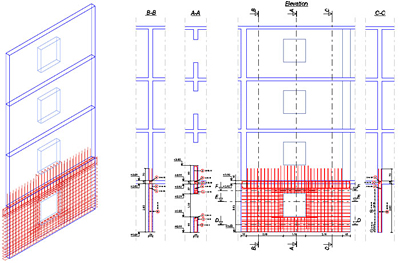
The following figure shows a reinforcement drawing for a wall with an opening. The reinforcement plan contains reinforcements, reinforcement symbols, dimension lines and altitude symbols.

Advance Concrete - Why is 'Copy 3D model' powerful?

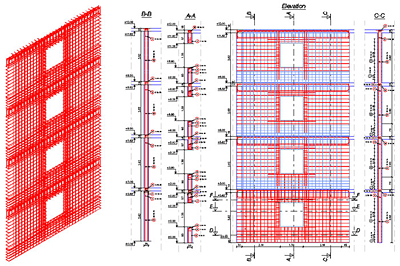
For the reinforcement of the walls for the rest of the stories, the “Copy 3D model” option was used. The user selected all the reinforcement bars, reinforcement symbols, dimensions lines and all the altitude dimensions. The 3D copy allows the user to create the 3D reinforcement assembly avoiding all the errors that can occur when using the AutoCAD “Copy” option. In addition, by using this option, the user instantly creates the definition bars and the corresponding distribution bars.

Advance Concrete - Why is 'Copy 3D model' powerful?

In conclusion, by using the “Copy 3D model” option, the user can create reinforcement drawings in a shorter amount of time because the manual insertion of the symbols and dimension lines is avoided. Also the reinforcement 3D model is correctly created.


Advance Concrete Dynamic Reinforcement


Creation of the reinforcement drawing is an important step in designing reinforced concrete buildings, which usually involves a lot of time, patience, skills and responsibility, as the created drawings should comply with specific standards.
Advance Concrete has a new reinforcement solution, easy to use in projects, so that the time spent for reinforcement drawing creation is considerably reduced.

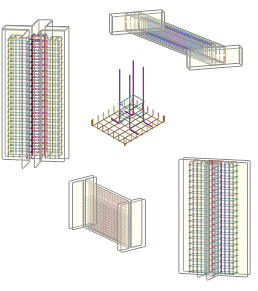
1. Predefined dynamic reinforcement solutionsAdvance Concrete: Dynamic reinforcement

  • Cantilever beams
  • Columns (stirrups and pin bars)
  • Door and window openings
  • Wall between two columns
  • Plain wall between walls

2. Flexibility in defining new dynamic reinforcement solutions
Advance Concrete provides:

  • A user friendly environment for reinforcement solution design
  • Various tools for the creation of all reinforcement elements necessary for the reinforcement cage
  • A wizard for saving the dynamic reinforcement solution

3. Easy to use

  • Automatic creation of a drawing from a set of structural elements. The drawing contains predefined views
  • Adding reinforcement elements using the Advance Concrete tools
  • Saving the reinforcement solution in an interactive mode

4. Reusing the reinforcement solutions
All reinforcements put in place using the “Dynamic Reinforcement” automatically adapt to formwork contours and can be taken into account in reinforcement drawing creation and lists.

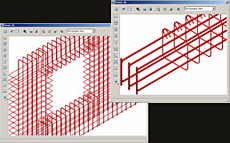
5. 3D ViewAdvance Concrete: Dynamic reinforcement
Based on the reinforcement representation in the views of the reinforcement drawing, Advance Concrete recreates the cage and displays it in 3D. It also detects collisions.

Benefits

  • The dynamic reinforcement solutions can be easily used in projects, so that the time spent for reinforcement drawings creation is considerably reduced. Common tasks, frequently encountered during the project development are simplified and reduced to simple parameter value input.
  • Once defined and saved, the dynamic reinforcement solutions can be applied in other projects; this minimizes the risk of errors and guarantees compliance with design rules and standards.
  • The drawings are kept up-to-date when projects are modified, and the risk of errors is considerably reduced.

Read full article here