The High End Steel Detailing Solution used in the construction industry in Turkey


In October 2011, ÇEKA Ltd, a market leader in steel formworks, has chosen to use GRAITEC Advance Steel. By using GRAITEC solution for modeling and detailing the steel structures since version 7.1, ÇEKA decided to speed up the time allocated to its projects with the new integrated intelligent functionalities. Thus, the engineers feature the Multi-User solution, which allows them to work simultaneously on the same project by assuring a secure data transfer between all 10 working stations. 

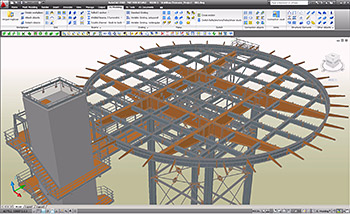
GRAITEC Advance Steel - The High End Detailing Solution used in the formwork construction industry by ÇEKA Ltd. in Turkey

Zerrin Kutay, Vice President of ÇEKA Ltd.: “The market demands more and more complex formworks and faster than before. Engineering design is a critical step in our production process and Advance Steel has been an integral part of our success since we first started using 5 years ago on a limited scale. We have now decided to extend the Advance Steel to all levels of engineering design and we are confident in Advance Steel’s continuing contribution to our success in capturing market growth.”

Ionel DRAGU, General Manager of GRAITEC Romania : “We are strongly confident about this cooperation with ÇEKA, which certainly will be the first step to our extension in the Turkish market. Moreover, we will be glad to share the success stories of ÇEKA, due to the use of Advance Steel.”

GRAITEC Advance Steel - The High End Detailing Solution used in the formwork construction industry by ÇEKA Ltd. in Turkey

About ÇEKA: 
In Turkey, the year 1976 in which ÇEKA has been established, the construction industry was not acquainted with the industrial formworks. In those years, limited number of companies which were in search of new technologies had worked with ÇEKA. 
Since then, ÇEKA is serving the growing demand by increasing the production capacity and introducing newer technologies in design & productions as well as complementary services like the sub-contracting, steel formwork rental services, along with offering products of the firms that ÇEKA represents. Within the range of limited firms, which use their own patent, technology and design, ÇEKA dwells on the design and production of more practical and more economical formworks. ÇEKA formworks, the result of 30 years of construction site experience, are designed within TS, DIN and ACI norms and been used by the constructors in Turkey and abroad. 
For more information, visit: www.ce-ka.com.tr 

Service Pack 1 of Advance Steel 2011


Service Pack 1 of Advance Steel 2011 provides the following to end-users:

• Compliancy of Advance Steel 2011 with AutoCAD® 2012
• Various enhancements

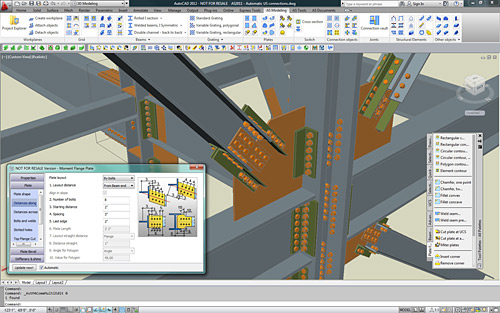
 SP1 makes Advance Steel 2011 compliant with AutoCAD® 2012 and AutoCAD Architecture® 2012 

Advance Steel - Compliancy with AutoCAD® 2012 and Autodesk® Architecture 2012


AutoCAD® 2012 enables the quick creation of documents from a variety of modeling formats, helping to reduce manual documentation workarounds. Capture and import as-built information to jump-start your design process. Plus, you’ll find a wide range of timesaving enhancements to the features you use most. AutoCAD® 2012 delivers the powerful tools you need to participate in smooth 3D design workflows, helping drive your projects to completion more quickly than ever before.
Advance Steel - Compliancy with AutoCAD® 2012 and Autodesk® Architecture 2012
With new and expanded workflows for 3D conceptual design, model documentation, and reality capture, AutoCAD® 2012 helps design professionals maximize productivity.
To get AutoCAD® 2012 compliancy, Advance Steel users can download Service Pack 1 from the GRAITEC website:www.graitec.com/advantage

 Service Pack 1 has different enhancements such as: 

  Shim plates in base plate joints can be created with or without a leveling plate.

Shim plates in base plate joints can be created with or without a leveling plate

  New option to define the front/view of profiles such as RHS in NC-DSTV files.
  Scribing within NC-DSTV files can be created as a partial line (e.g. each line longer than 20mm will be split into several lines with a length of 10mm).
  The functionality to connect railing handrails works between straight and curved railings.
connect railing handrails works between straight and curved railings  The libraries have been extended with some additional sections and bolts.

New partnership for Australia signed with Beyond 3D


 GRAITEC  announces a new strategic authorised consulting agreement with Beyond 3D, a company located in Melbourne, Victoria. The partnership agreement signed between the two companies entitles Beyond 3D to promote and sell the Advance Steel software solution as well as provide training and support in Australia. 

Combining 18+ years prior industry experience across a wide range of drafting disciplines – Beyond 3D delivers value and lateral insight into the most challenging of projects.

As a “GRAITEC Authorised Consultant”, Beyond 3D offers their customers and clients the option to purchase GRAITEC Advance Steel 3D/2D CAD software, for unrivalled large scale structural steel & mechanical, design and shop detailing – backing up GRAITEC’s software products with comprehensive customer support and training options.

GRAITEC’s Advance Steel software natively incorporates Australian Standards, combined with Beyond 3D’s insight and knowledge of Australia’s best industry practices, Advance Steel positions itself as the leading steel detailing solution in Australia.

GRAITEC and Beyond 3D share the goal of bringing to the market competitive technology solutions that will increase their customer productivity for steel structural design, modeling and detailing.

Pascal Bergougnou, Managing Director of GRAITEC Asia Pacific, comments: “I am glad to welcome Beyond 3D into the eco-system of GRAITEC. We are confident that the Australian market has endless opportunities and that Beyond 3D will accelerate our development in this region thanks to its deep knowledge and experience of local standards and practices.

Max Frederick, Director of Beyond 3D adds: I am honored to be welcomed into the friendly team at GRAITEC. For years I have been a consumer of compromised CAD software products delivered with average customer support. Given my experience and my evaluation of the GRAITEC product and company, I believe that Advance Steel will become “the” leading detailing software in Australia. 

About BEYOND 3D
Drafting – Software – Training Broad practical experience of the Australian Industry, combined with comprehensive knowledge of the Graitec product, to provide the customer with a trusted comprehensive solution.
For more information, please visit www.beyond3d.com.au.

BIM transfer between Advance Steel and Advance Design


GRAITEC Advance BIM suite enables users to transfer 3D models between Advance Steel and Advance Design, whether it is standard sections from the software’s library or user sections.

 Choosing elements to transfer from Advance Steel to Advance Design 

Among all their different properties (size, material, length, weight, part mark number, etc.), Advance Steel elements are defined by the “Structural member” property. When importing these elements to Advance Design using the GRAITEC BIM center, elements for which this property is not activated will be ignored (e.g. kickrail of a railing, etc.).

If an element has its “Structural member” property selected, it will be imported in Advance Design.

 BIM transfer between Advance Steel and Advance Design

 Creating a user section in Advance Steel and get it also in Advance Design 

In addition to the standard sections (e.g. I beams, angles, tubes, etc.) that are provided when installing the software, Advance Steel end-users can define (and store in the library) any user sections.
Easily create a new user section in Advance Steel and save it so that it can be available in the drop-down list. This will allow the use of this section in the Advance Steel 3D model.

 BIM transfer between Advance Steel and Advance Design

To have this user section available in Advance Design, start Advance Design and go to Edit > Used cross sections. In the dialog box which appears, click the “Add” button to add a new section. In the Advance Steel category, choose the user section called “Usersection“. Select the section that is previewed in the table.

 BIM transfer between Advance Steel and Advance Design BIM transfer between Advance Steel and Advance Design

Your user section is now available: create a beam in the Advance Design model and choose the user section that you have just imported.
You now just have to apply the different loads on your structure (snow, wind, loads, etc.) and to start the optimization of your structure!

Online Live Demo for GRAITEC Advance Steel dedicated for the Turkish market


Advance Steel key featuresFollowing an increasing interest from the Turkish market, on 9th of November 2011, starting at 10.30 EEST, a Live Demo for Advance Steel 2011 will take place. This presentation, which will be held in Turkish language, is addressing to all specialists, engineers and drafters involved in the structural engineering domain from this market.

This is for the first time when GRAITEC  holds a dedicated webinar for the Turkish market, due to a continuous economical growth during the last decade, especially in this domain.

Anyone can subscribe to this live presentation by accessing the link bellow:

Register online for Wednesday, 9 November 2011, 10:30 EEST
live demo – in Turkish

All the participants will get in touch with the use of GRAITEC Advance Steel which accelerates the design phase by offering an extensive library of smart objects, automatic joints and specific tools for modeling and detailing any kind of steel structures, stairs, railings and miscellaneous steelwork.

For more details, you can check this page (info in English) or this page (info in Turkish).

GRAITEC GmbH acquires TREPCAD GmbH


 GRAITEC  is pleased to announce the acquisition of TREPCAD GmbH through its German-based company GRAITEC GmbH. The aim of both companies is the connection of TREPCAD, the software for staircase construction to Advance Steel, the 3D CAD software for steel construction, and also the worldwide development of the market segments for staircase construction. 

For 10 years, TREPCAD GmbH has been developing and distributing its software for staircase construction in the German speaking market. The company is specialized in the construction of stairs made of steel and stairs made of a combination of wood and steel. Used by more than 2600 customers, TREPCAD software is easy to use and very powerful and especially well-known by companies specialized in miscellaneous steel, schools and educational facilities.

With this acquisition, both companies want to share their expertise. Their common aim is the connection of TREPCAD Software to Advance Steel, and also the worldwide development of the market segments for staircase construction. By working together with GRAITEC’s large and competent R&D team, the innovative ideas of TREPCAD’s stair and railing solution specialists will be developed faster in the future.

Francis Guillemard, GRAITEC CEO, comments: The acquisition of TREPCAD allows the Group to strengthen its leading position in the steel market by supplementing its steel CAD solution software that addresses a complementary market: the metal work companies who need easy and quick tools to generate drawings.

Norbert Schulze-Kahleyß, founder and manager of TREPCAD GmbH, adds: “Thanks to GRAITEC’s worldwide network and its powerful and important R&D Department, we are convinced we will be able to distribute our software internationally.

About TREPCAD 
TREPCAD GmbH was founded in 2004 by Dipl.-Ing (FH) Norbert Schulze-Kahleyß. He started to develop the well-known software for staircase construction “TREPCAD” in 2000. Today the company has 2600 customers in the German speaking market. In 2006 TREPCAD GmbH received the “award for excellent and innovative benefits for their handcraft”. For more information, please visit www.trepcad.de.

ParkerSteel highlights the benefits of using NC files in the steel industry


Advance Steel automates the production of drawings, BOMs and NC filesParkerSteel, the largest privately owned steel stockholders in England, employing over 450 people, and one of the major firms bringing employment to the Canterbury area, is promoting ADVANCE Steel as one of the standard “100% error free” solutions used for producing NC files.
“[…]it has become apparent that all parts of the steel supply chain are benefiting from the increased use and speed of NC files to exchange information for quotation and production purposes.”

One of the main benefits of ADVANCE Steel is, automatically generating NC files from the model, used to directly control the CNC machinery. As a result, using NC files can improve productivity, minimize the cost of errors, speed up production and finally, make the business more competitive.

Advance webinars


Structural Engineers, Steel and Concrete Detailers…discover how to gain productivity and reduce errors with our BIM software

Advance Steel: Professional Steel Detailing Software Solution for AutoCAD Advance Steel 
Tuesday, October 25th, 2011
    from 10:00 to 10:30 CET
    from 17:00 to 17:30 CET
Advance Concrete: Professional Reinforced Concrete Design Software Solution for AutoCAD Advance Concrete 
Wednesday, October 26th, 2011
    From 9:00 am to 9 :30 am CET
    From 5:00 pm to 5 :30 pm CET
Advance Design: Professional Finite Element Analysis Software according to European standards Advance Design 
Thursday, October 27th, 2011
    From 9:00 am to 9 :30 am CET
    From 5:00 pm to 5 :30 pm CET

BIM GRAITEC Advance provides designers and detailers with an optimal working environment with tools to create and completely carry out their construction projects: optimization of construction materials, elimination of project inconsistencies, faster study turnaround time, automatic document creation, project history and tracking, fluid communication with project partners.

steeldetailingsoftware.co.uk recommends ADVANCE Steel


Advance Steel Project: Ziemann - Helicopter BaseAccording to www.steeldetailingsoftware.co.uk, ADVANCE Steel is the best choice for steel detailing and steel engineering software, after closely analyzing the main key software selection criteria: cost, profitability and functionality.

The website states that Advance Steel is exceeding other software like Tekla or StruCad (which have significantly larger backgrounds in steel detailing and engineering) when it comes to interoperability with other platforms, functionality and drawing output. What they consider to make this software special is its accessibility to any type of company which is interested in investing in steel detailing software.

Advance Steel Project: TONGON GOLD

As they say,  Advance Steel has a far shorter learning curve than its competition, fabrication and drawing output “is exceptionally flexible” and offers businesses in this sector an affordable solution. “Functionality wise Advance Steel detailing software has everything you would expect from a specialist structural steel detailing package […]”, its adaptability evolving trough time, becoming more appealing to customers.
Although, ultimately, the best software is the one that addresses the businesses needs and issues, their conclusion is that “Advance Steel is a clear winner using the selection criteria adopted as this applies to most businesses seeking increased productivity and profitability gained from the adoption of specialist technology[…]”.

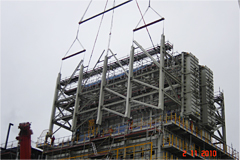
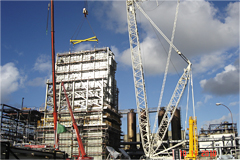
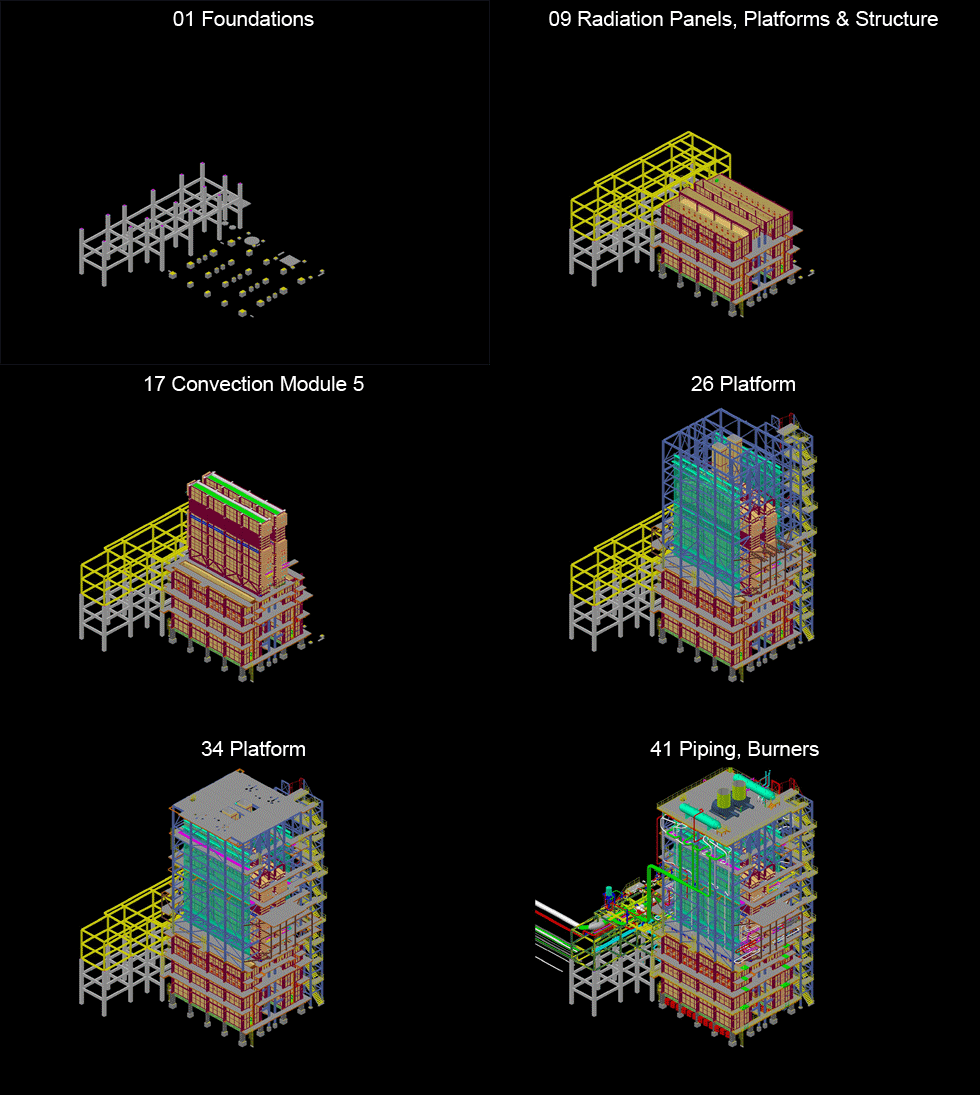
Advance Steel Project: Steam Cracking Furnaces


HEURTEY Group is the World largest independent group with a presence in 34 countries. Heurtey is an expert in design & fabrication of Process Fired Heaters Refining, Petrochemical and Hydrogen Industries.

In September 2009, the HEURTEY Group won a major contract in the Petrochemicals sector on behalf of Total Petrochemicals. This contract covers the supply of two ethylene cracking furnaces for the Gonfreville plant in Normandy and is part of a modernization project of the steam cracker during next turnaround scheduled in September 2011. Heurtey Petrochem has used technology from Shaw Energy and Chemicals (Stone & Webster) to complete this turnkey contract, which includes on-site assembly work.

Advance Steel Heurtey Steam Cracking Furnaces Advance Steel Heurtey Steam Cracking Furnaces

Heurtey Petrochem Romania is the main detailing design office of the HEURTEY Group, fully involved in this project, with 30 engineers and technicians specialised in the mechanical design of furnaces and trained in the use of GRAITEC Advance Steel 3D design software.

The two furnaces, pipe rack and steel structures are prefabricated and manufactured by Beta-Heurtey, the Group’s Romanian fabrication workshop.
Delivery of the furnaces is planned for July 2011.

Location: Gonfreville Refinery, France
Design office: Heurtey Petrochem SRL Romania
Beneficiary: Total Petrochemicals
Technology: Shaw Stone & Webster

Advance Steel: 2 Steam Cracking Furnaces

Advance compliant with AutoCAD® 2012


Advance is compliant with AutoCAD 2012Advance is compliant with AutoCAD 2012GRAITEC  announces the compliancy of Advance Steel andAdvance Concrete with AutoCAD® 2012 and AutoCAD Architecture® 2012.

Advance Steel and Advance Concrete are part of the GRAITEC structural BIM solution, and have been developed for design offices, building industries, steel and concrete detailers.

Advance Steel is specifically designed for structural engineers and steel detailers who require a professional and easy-to-use BIM structural steel detailing software that automates the creation of workshop drawings, general arrangement drawings, BOMs and NC files.

Advance Concrete is specifically designed for structural engineers and reinforced concrete detailers who require professional and easy-to-use BIM software that automates the production of formworks and reinforcement drawings, BOMs and NC files.

Advance compliant with AutoCAD 2012

AutoCAD® 2012 enables the quick creation of documents from a variety of modeling formats, helping to reduce manual documentation workarounds. Capture and import as-built information to jump-start your design process. Plus, you’ll find a wide range of timesaving enhancements to the features you use most. AutoCAD® 2012 delivers the powerful tools you need to participate in smooth 3D design workflows, helping drive your projects to completion more quickly than ever before.

With new and expanded workflows for 3D conceptual design, model documentation, and reality capture, AutoCAD® 2012 helps design professionals maximize productivity.


Keep track of changes during the project revision stage


Often, during the review stage of a project, different changes might be necessary such as:
– New details (views) added on the drawing to provide additional information
– Model modifications such as element geometry, element position, material, new elements

Model modifications affect the existing drawings. Since there are several people involved in the review process, it is useful to keep track of the changes made.

 Standard practice 

According to standard practice in maintenance of engineering drawings, changes made in the model during the review stage of a project are identified using a number or a letter code and are listed in the revision table on the affected drawing. For each revision level, the revision table lists the reviewer (author) and a short description of the change made. Additionally, revision clouds are used to draw attention on modified areas of the drawing.

 CAD techniques 

Using simple CAD software, the elements are modified and revision clouds are drawn manually – a task that requires patience and significant attention to mark and then locate the changes in the drawing. The revision table is drawn using simple entities (lines and text) and updated manually. Additionally, a document management system can be used for drawing revision control.

 Advance Steel – Easier revision management 

Detailing software like Advance Steel allows keeping track of the changes in drawings similar to traditional revision control, but with a lot of improvements in the workflow:

  • Drawing update
  • History and backups
  • Tracking of changes in the revision table
  • Marking changes using revision clouds

Read more here

New Valenciennes Stadium modeled with Advance Steel


The new stadium in Valenciennes, France, is located near the original one, and has a 25000-person capacity. It is meant to host the Valenciennes Anzin Football Club’s games. ETI Design Office, which has experience in designing several stadiums, is in charge of this project. In addition to the project’s size, the expectations of the Architecture’s Office – with the major constraint of not letting any bolts appear on the steel structure – have called for the use of Advance Steel for easy fabrication and erection at site without errors.

The conception of the new Valenciennes Stadium has required the expertise of ETI Design Office, which managed the complete study of the Alps stadium of Grenoble (France) in 2006 and worked on the extension of Marcel Picot stadium in Nancy in anticipation of the Euro 2016 football cup that will take place in France. The size of the project required four people working full-time on it: one Project Manager, Mr Fabrice Grisot, one Construction Engineer, Mr Stéphane Dottori, and two draftsmen.

  About the use of Advance Steel  

ETI started using AutoCAD® to draw the first lines of the project in 2D and submit it to the contracting owners. The project owner and architect’s need to view more precise details in 3D about the most complex assemblies required the use of Advance Steel, which has a Building Information Modeling (BIM) approach.

With the flexibility of its numerous tools, Advance Steel enabled fast modeling of all steel structural elements, whether by using integrated libraries of standard sections or by using the automatic conversion tool that allows converting AutoCAD® elements into polygonal plates.

  A steel structure without any visible bolts  

In order to follow the architect’s wish to have no visible bolts on the structure once the construction is erected, ETI had to design assemblies early from the study phase. Thus, bolted assemblies were designed to ease the transport of parts (that can reach a weight of 10 tons each) and the parts were welded together at site with fastening plates. The welds were then painted and grinded to get a perfect aspect. Therefore, it was necessary to model many weld preparation chamfers on the edges of the plates and the profiles to get a realistic result and, most of all, for these elements to appear clearly on the fabrication drawings.

From the 3D model that is automatically numbered, Advance Steel allowed the automatic creation of all fabrication and assembly drawings, with all the necessary labels and dimensions for the workshop. In addition to the drawings generated as DWG files that can be easily read by the architect, the steel parts could be directly transferred as DSTV and DXF files to the CNC machines located in the workshop of a subcontractor in charge of the fabrication of the structure.

  Assembling the steel structure without errors  

The assembly drawings generated from the 3D model included all the necessary 2D and 3D views for the assembly teams to perfectly understand everything at site. Since all verifications of clash detection were applied on the Advance Steel digital 3D model, no adaptations at site were needed during the erection of the structure.

This slideshow requires JavaScript.

Advance Steel Project: Industrial Plant


Location: East Coast, USA
Design office: Rouleau-Desaulniers

Project description:
Additional equipment supports access platforms for a new engineered wood factory. Total weight: ~340 tons. More than 1350 shop drawings prepared

The fact that Advance Steel is based on AutoCAD® made the 3D modeling of the mechanical equipment and ducting easy. This is necessary to avoid any interference between the mechanical equipment and the structural and miscellaneous elements.
Marc DESAULNIERS, Project Manager, Rouleau-Desaulniers

This slideshow requires JavaScript.

NASCC show in Pittsburgh was a success!


The GRAITEC Advance Steel team exhibited at NASCC, the steel conference in Pittsburgh, Pennsylvania, on May 11-14, 2011.

The show attendance was limited and got off to a slow start but by the time it was over we received an excellent amount of serious leads which will translate into interesting sales…

The US economy is definitely improving and this is good news for all markets.

Congratulations to M. Robert Beauchamps, owner of Datadraft Structural Detailing, (Montreal!) for winning the Advance Steel pro license.

This slideshow requires JavaScript.

Advance Steel – Stairs and Railings


With its advanced feature set, Advance Steel supports the design of complex structures such as straight and spiral stairs, railings, cage ladders, etc. Advance Steel creates all necessary documents (including NC files) for the stair fabrication using a user selected template.

Quick and easyAdvance Steel: Stairs - Quick and easy
Once the user selects 2 points, the stair with its stringer and treads (including connection to the stringer) is created.
The tread distances are calculated using a standard formula for determining the ergonomic height and length of the step.

The stair can be modified using profile types for stringers, connection types between the treads and the stringers, lower and upper landing

Instant railings
Once the stringers are selected, the railings are created using the user defined start and end points.
Railings of any type can then be modified. Features include:

  • Profile types for posts, handrail and kickrail
  • Controlled positioning of posts, top handrail, middle handrail and kickrail
  • Connection between posts and stringers
  • And more…

If the stair length and width are modified the railing is automatically updated!

Spiral stairs
Using the Advance Steel advanced tools, with a few clicks defining the height, the tread width and direction, the entire stair can be created. Various options are available:

  • Large library of tread types
  • Treads can be welded to the central post or connected by a profile or a bolted plate
  • And moreAdvance Steel: Stairs - Spiral stairs

Cage ladders
All elements of a cage ladder are inserted by two points defining the height. The number of rungs can be defined or calculated according to the distance between the rungs. The user can modify then the shape and the size of the elements.

Easy to customize 
Stairs and railings can be customized through the Properties dialog box.
The tabs of the Properties dialog box are grouped in logical categories to simplify the use of this powerful feature.
The user can modify the parameters (dimensions, treads types, connection types, etc.) to get the required structure. All modifications are visible in the model as they happen.

Automatic drawings
Once the stair is modeled, the user may select a template for the workshop drawing. Advance Steel then creates all the necessary documents (including NC files) for the stair fabrication. The drawings are automatically labeled and dimensioned. The user can customize the drawing layout using the Drawing Style Manager.

Read full article

How does Quick Draw work


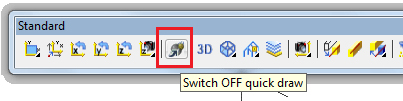
Starting with version 2010, Advance Steel provides a setting that, when active, will improve working speed while modeling in shade mode. This option is called Quick Draw and can be found on the Standard toolbar.

It has two settings:

  • Quick Draw OFF. This is the normal shade representation without any speed improvement. All objects or features will be represented normally.
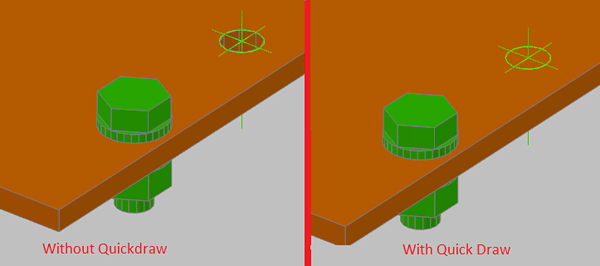
  • Quick Draw ON. When this setting is turned on, Advance Steel will run faster when modeling in shade mode. This is due to two representation modifications made to AS objects, which improve the shade speed, specifically for large models. These modification are:
    • – Holes will no longer be visible on the element. The feature will still be displayed, but the hole will not. This does not affect the detailing, and the bolt even if apparently collides with the plate/beam, it will not, as the hole still “exists”, it simply is not displayed.

How does Quick Draw work

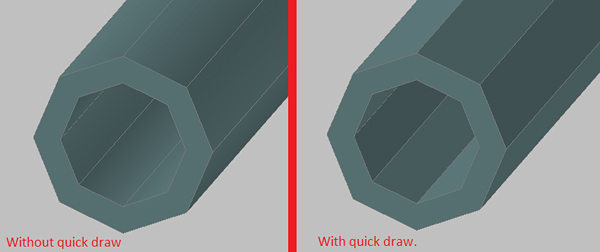
    • – Round surfaces on tubes lose the smooth curved surfaces appearance. See the comparison in the following figure:

How does Quick Draw work
Switching between the two representation of Quick Draw can be done by simply clicking the button, the model does not require a regen, which makes it possible to use this option for fast modeling in shade mode and then switching quick draw off to view the model at the maximum rendering capabilities of AutoCAD.