Advance Steel for StruCAD users


Advance Steel for StruCAD users

Advance Steel, the alternative solution to StruCAD

GRAITEC Products: CAD and Design Software for the Construction Industry

  • Proven track record with more than 10,000 seats worldwide: Trusted market confidence
  • Rapid adoption rate resulting in +50% growth in licenses in 2011: Tried and tested solution
  • Increased functionality / productivity: Tools for all market sectors: BIM, Structures, Off-shore, Bridges, Architectural, Sheet-metalwork,…
  • Works as a standalone application or with AutoCAD: Flexibility for users to choose platform to that suits them – no need to have AutoCAD
  • Low initial financial outlay: Best value system on the market
  • Lower on-going cost of ownership: Premium support & maintenance less than half the price of other systems
  • Easy to use and short learning curve: 5 day foundation training course; 3-days transition training from Strucad, includes full training manual
  • Quick and easy deployment: Set up company drawing borders in minutes
  • Interoperability: DSTV NC files in all versions, IFC, SDNF, CIS2, Graitec BIM, KISS, PSS, …
  • Support and Helpdesk service rated 98% excellent or good by our users: Dedicated team ready to help you by phone, email or remote assistance

Advance Steel 2012 videos

Advance Steel 2012 – Easy and efficient modelling tools
Advance Stel 2012 – Easy  and efficient modelling tools
Advance Steel is a complete 3D BIM steel detailing software providing automatic and user-friendly tools for creating the 3D model of your building in the best time.
From the creation of the portal frames to the generation of all cladding profiles, Advance Steel comes with numerous easy-to-use tools for purlins, side rails, automatic connections, stairs, railings and much more!
Advance Steel 2012 – Navigation through a 3D model
Advance Stel 2012 – Navigation through a 3D model
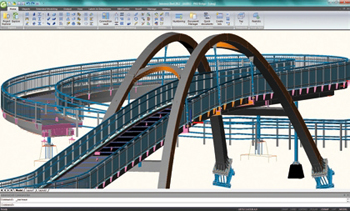
See how user-friendly and powerful Advance Steel 2012 is to navigate through a complex pedestrian bridge (model courtesy of PKD, Czech Republic).

Customer Projects

Advance Steel CIS/2 interface Advance Steel CIS/2 interface
Coke oven gas desulphurization done by
Hutni projekt Frydek-Mistek a.s with Advance Steel
New Valenciennes stadium done by
ETI with Advance Steel
Advance Steel CIS/2 interface Advance Steel CIS/2 interface
U2 “360° concert” stage done by
Stageco with Advance Steel
Steam cracking furnaces done by
Heurtey Petrochem with Advance Steel

2012 GRAITEC R&D Awards


This year, GRAITEC presented the 2011 R&D AWARDS to 5 members of the R&D department in Romania. The awards were handed by Francis GUILLEMARD, CEO and founder of the GRAITEC Group, at the 2012 Kick Off, in Bucharest.

The first 2011 Development Award was received by Bogdan ZAVU (Advance Concrete Team Leader) and Emil MOGA (Advance Concrete Senior Software Engineer), for the new DWG export procedure. The DWG export procedure is a key feature of ADVANCE Concrete, which was fully rewritten, resulting in a major speed improvement.

Development Award was received by Cosmin BARBU and Diana SERBANThe second 2011 DEVELOPMENT AWARD was received by Cosmin BARBU (Advance Design Project Manager) and Diana SERBAN (Advance Design Senior Software Engineer), for Crack Analysis, taking into account real reinforcement on beams and columns. Until now, Advance Design was dealing with the required reinforcement with regards to Concrete Design. Version 2012 of the software is making a big step forward, as Advance Design is now helping the user to determine the real reinforcement section and performing EC2 crack analysis.
The engine of Arche Beam was extensively reused and adapted for this project.

TECHNICAL AWARD FOR BEST DEVELOPMENT was received by Mircea KLEPSThe TECHNICAL AWARD FOR BEST DEVELOPMENT was received by Mircea KLEPS (Advance Steel Senior Software Engineer), for the Graitec Modeler as part of the Advance Steel Standalone project. The component was first started by Mihai DOBRESCU and continued by Florin SECUIANU and Mircea KLEPS, Mircea being the one whose fingerprint was decisive for the current engine state-of-the-art status.

In the next step, the component will be used for driving Advance Concrete.

For more information on all the new features of the 2012 GRAITEC Advance suite, please visit the GRAITEC ADVANTAGE page at http://www.graitec.com/en/welcome.asp .

This slideshow requires JavaScript.

GRAITEC will be exhibiting at NASCC 2012 in Dallas, Texas, April 18-20, 2012


March 22nd, 2012. GRAITEC is pleased to announce that the GRAITEC North American team will be exhibiting at NASCC, the steel conference in Dallas, Texas, on April 18-20, 2012 at booth #610.

The GRAITEC team will be demonstrating Advance Steel 2012, the powerful and user-friendly 3D structural steel detailing and fabrication software that automatically creates drawings, BOMs and NC files, and that communicates with Autodesk® Revit® among other systems.

Version 2012 of Advance Steel provides the user with the choice of CAD platform, AutoCAD or the GRAITEC CAD platform. The team will be demonstrating Advance Steel with both platforms at the NASCC.

GRAITEC will also be demonstrating Advance Design 2012, a superior solution for the structural analysis and design of Reinforced Concrete, Steel and Timber structures according to the latest versions of Eurocodes and North American codes.

During the NASCC, GRAITEC is offering

3 workshops on Thursday, April 19:

More doors open to Advance Steel


With the shocking Strucad announcement, Strucad users are now faced with a difficult decision – or is it?
For anyone involved in Structural Steelwork, the way GRAITEC UK sees it, there is a clear and easy choice, Advance Steel 2012!

Advance Steel 2012 offers:

– Proven track record with more than 10,000 seats worldwide

  •  Trusted market confidence

– Rapid adoption rate resulting in +50% growth in licenses in 2011 – 

  • Tried and tested solution

– Increased functionality / productivity 

  • New tools for all market sectors: BIM, Structures, Off-shore, Bridges, Architectural, Sheet-metalwork…

– Works as a standalone application or with AutoCAD – 

  • Flexibility for users to choose platform to that suits them – no need to have AutoCAD

– Low initial financial outlay 

  • A fantastic GRAITEC UK ‘Switch-offer’

– Quick and easy deployment

  • Set up company drawing borders in minutes

– Interoperability 

  • DSTv NC files in all versions, IFC, SDNF, CIS2, Graitec BIM, KISS, PSS…

– Support and Helpdesk service rated 98% excellent or good by users  

  • Dedicated team ready to help you by phone, email or remote assistance


The GRAITEC UK branch has never received so many phone calls and enquiries from people looking for an alternative solution to Strucad, and the feedback from those that have already moved to Advance Steel was “easy to use” and “very capable”.

If you have been affected and would like to see more about Advance Steel why not visit www.graitec.co.uk/advance_steel_2012.html or contact one of the Graitec UK team on 0844 543 8888 or email your enquiry to sales@graitec.co.uk

The versatility of Advance Steel can help you realize projects out of the ordinary!


With Advance Steel, our users can create amazing projects.  Our American users understand this and have created incredible structures with it.  Tuckerman Steel Fabricators Inc. were able to harness the power of Advance Steel to create their latest project, something special that was launched on 11/11/2011 and captured on video.  Check it out at Boston Tea Party Ships and Museum-Launching 11 11 2011!

The project shown is a steel barge supporting a 3 story building consisting of shops, a museum, and restaurants, including ballast compartments, stair wells, elevator compartments, watertight doors, gangway support platforms and pile guides. The barge had to be pre-fabricated in panels – deck panels, bottom panels, bulkheads, side panels, and very often panels that included over 150 parts. Accordingly to Ilko Dimitrov, Project Manager at Tuckerman Steel Fabricators Inc., Advance Steel increased the productivity and the accuracy of the drawings: “The software was very helpful in detailing the panel drawings and all the interior framing and stairs as well”.

Also, the designers of the barge noticed that Advance Steel is very well designed to optimize drawing layout by eliminating empty spaces between members, and has the option to create running dimensions from left to right and vice versa, and the option to switch between absolute and relative or both types of dimensions. The scaling of objects is very easy. Placing labels, part marks, material type and basically all necessary information is very handy. Creating and updating BOM is fast and accurate.

Tuckerman Steel Fabricators, Inc. based in Boston, MA is incredibly proud of the results obtained with Advance Steel.  The week after they were trained on Advance Steel they were able to model and detail the entire barge.  They were able to meet their fabrication and shipping deadlines without any errors!

This slideshow requires JavaScript.

GRAITEC launches its Czech website


AB Studio is pleased to announce the launch of the new Czech GRAITEC website, thus making the Advance  suite, but also CADKON and TREPCAD, available to engineers and structural draftsmen in Czech Republic and Slovakia.

While looking for comprehensive and easy to use detailing software solutions, consider CADKON (link to http://www.graitec.cz/cadkon.html), a convenient and powerful tool with simple controls, specifically designed for creating advanced construction drawings, and now can be run as a standalone application.

The website provides information on the GRAITEC ADVANCE suite, with its many new features and improvements included in the 2012 versions, with special focus on the Czech version of Advance Design (http://www.graitec.cz/produkty-advance/advance-design.html) and the fact that starting from the latest version, Advance Steel (http://www.graitec.cz/produkty-advance/advance-steel.html) breaks free from AutoCAD.

Another novelty for Czech users is the Czech version of TREPCAD, a dedicated and comprehensive stair modeling and detailing software that will be available to Czech customers in March, 2012.

The website also includes a customer reference section (link to http://www.graitec.cz/reference/), where there is information about our clients remarkable designs – the most elaborate projects made with ADVANCE or CADKON software solutions can be viewed.

AB Studio, a part of the international GRAITEC Group and one of the largest suppliers of CAD / CAE solutions in the Czech Republic, invites you to visit us at www.graitec.cz!

This slideshow requires JavaScript.

Another success story: customer in Canada thrilled to work with Advance Steel


A recognized and expanding company in the manufacturing of steel structures and wrought metals situated in Quebec (Canada), Pro-Mec Elite Inc., has chosen GRAITEC Advance Steel 2012 as its steel detailing software.

Pro-Mec Elite Inc. was using AutoCAD and Inventor so far to do all their studies. They recently decided to move to a 3D BIM solution in order to gain productivity with their drill-line from Ficep and analyzed all software available on the market.

After an extensive review of several software packages such as TEKLA Structures, SDS/2, and StruCAD, they found that Advance Steel is much easier to use and with the advantage to be based on AutoCAD.

GRAITEC Inc. had different meetings with Pro-Mec Elite Inc to answer their expectation and demonstrate that Advance Steel is the right solution for the type of structures they are daily doing.

Therefore Pro-Mec Elite Inc. decided to purchase 2 seats of Advance Steel (with the potential to acquire 4 additional licenses as 6 detailers are working the company) and followed the training 2 weeks ago in the office of GRAITEC Inc (Montreal).

Already, after only 1 week using Advance Steel, they noticed a significant time gain in the realization of drawings and are very satisfied with the software and customer service at GRAITEC.

More information on Pro-Mec Elite Inc. website: http://www.promecelite.com/news/purchase-of-graitec-advance-steel_12

This slideshow requires JavaScript.

Are you ready for the Eurocodes?


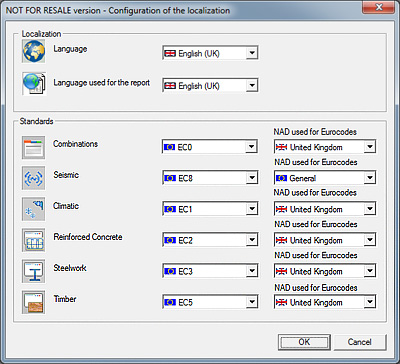
Are you ready for the Eurcodes? GRAITEC’s  Advance Design 2012 is!  The latest version includes all of the UK National Annexes for EC0, EC1 (climatic), EC2 (concrete), EC3 (steel) and EC5 (timber).


 Many top UK engineering consultancies have already decided to move over from British Standards to the Eurocodes and Advance Design is making this transition very easy.A very intuitive and easy to use CAD interface takes the stress out of model creation and this is made even easier with intelligent BIM connections to many industry standard file types including IFC, SDNF, PSS, CIS2 and DXF.  Fast finite element analysis and design with automatic mesh generation and member optimisation allow for many different iterations of you model in quick succession.  Easy to create result reports and documentation in many formats including DOC, PDF and EXCEL. Advance Design is the complete package for Eurocode Design.

Advance Steel 2012: CAD platform freedom


Advance Steel® is specifically designed for steel professionals who require an easy-to-use 3D structural steel detailing software for automating drawing production.


 Choice of graphical platform and improved ergonomics 

Historically based on the AutoCAD® platform, Advance Steel 2012 allows users to use their software with or without AutoCAD®. In fact, the product includes its own graphics engine, and the user can select the desired CAD platform. Regardless of the selected platform, all the essential functionality of the software is retained, as well as DWG® compatibility.

This major change has also allowed GRAITEC to simplify the user interface by focusing on and organizing the industry specific functionality of the software and the BIM integration. A “BIM Center” facilitating data exchange is available.

Another major impact for the user: the overall cost of the solution and the ease of installation and deployment. The return on investment of Version 2012 is improved by 30%.

Advance Steel 2012: Choice of graphical platform and improved ergonomics


 New automatic controls for 3D modeling 

Version 2012 also has many other improvements, the main ones are as follows:

  • Management of a preliminary reference mark to improve the traceability of elements from their creation to manufacturing
  • Option to group similar connections to manage and change them in a single operation
  • Implementation of new automatic connections (e.g., turnbuckle bracings, purlin connections with sleeves, connections between steel and concrete elements)
  • All new connections work on standard and cold rolled profiles
  • Numerous modifications in the existing connections, including in the field of metalwork.
Advance Steel 2012: New automatic controls for 3D modeling


 Extensive libraries 
Advance Steel 2012 provides libraries with lots of new and updated profiles and bolts:

  • Cold rolled profiles ( Joris IDE, Kingspan, etc.)
  • Cladding sections (Perfitec, Metecno, Corus, etc.)
  • Bolts and connectors (Lindapter, Australian bolts, etc.)


 Enhancements for high quality drawings 
Following on from previous versions, Advance Steel 2012 continues to improve the overall quality of drawings created automatically by the software:

  • Several new drawing styles delivered and ready to be used
  • Lists on drawings can be customized to include formulas (e.g. elements weight + 5%)
These new options increase user productivity and protects the production and management of documentation of their steel construction projects.

Movable overland tripper detailed with Advance Steel


Clinton Dantu, the CEO of Dantu Drafting cc. (South Africa), explains why Advance Steel was the right tool to handle this complex project and for creating all detailed drawings.

Dantu Drafting cc. is a registered company formed five years ago to meet the high demand for an independent drawing office not affiliated to any particular Consulting or Engineering firm. We entered the market with many years of experience in Materials Handling, Process plants and Heap Leach layouts. We added detailing to our résumé as we found managing the drawing work from layout to fabrication gives us the edge over any of our competitors and speeds up the completion time of the job as a whole. We have been using Advance Steel for the past four years and we are really impressed with its 3D modelling capabilities and the speed with which one can complete any project.

Movable overland tripper successfully detailed with Advance Steel

The Movable overland tripper (mot) is a hydraulic driven and steered machine. We used wheel mounted Bonfiglioli 713 c3b with brake and disengagement planetary 142:1 gearboxes. The mot will be used in Zambia at Luanshya copper mine, to feed a heap leach system. The total mass of the machine is 45 tons with a total length of 38 meters and a total height of 9 meters. The mot is needed to be an all-wheel drive machine, as it runs above a 900 wide overland conveyor over uneven terrain.

Movable overland tripper successfully detailed with Advance Steel

We used Advance Steel for this project so we could do all our layout work in 3D and still easily supply the client and designers with 2D AutoCAD® drawings from which we could all sit around a table to discuss the concept. After our meetings we could update our 3D model to suit any comments and so update our 2D AutoCAD® drawings in time for the next meeting. Having the model proved to be a great tool in getting any new parties involved up to speed with the project, just by showing them the model they would get an immediate insight in to the project. Once the mot’s concept was approved and the design was complete we could continue with creating the connections and then the shop detail drawings. With a certain amount of input we could update our shop drawings to suit our fabricators requirements.

Movable overland tripper successfully detailed with Advance Steel

Using Advance Steel for this project helped us speed up the design time for the mot as we had a constantly updated model to keep all involved with the project informed of our progress and ideas. By using Advance Steel as the 3D steel detailing application, productivity gains of over 25% were realized, compared to using regular AutoCAD®.

Movable overland tripper successfully detailed with Advance Steel

Engineering office: Dantu Drafting cc (South Africa) – http://dantudrafting.com/
Project: Heap leach project
Client: Luanshya copper mine
Location: Muliashi Copper Mine (Zambia)

Advance Steel Project: Mugam Evi Concert Hall


Here is a great example of GRAITEC’s versatile modeling BIM software ADVANCE Steel : Mugam Evi Concert Hall

Project location: Baku, Azerbaijan

Design Office: NCA Container- und Anlagebau GmbH

Project description:
The concert hall consists of 500 tons of steel. A specific feature of the project was the creation of the whole steel construction. The construction mainly consists of three-dimensional rolled pipes. Additionally each single pipe had elliptical-shaped radii on two levels. The parts of the steel construction had to be connected in an elegant way, to give the building a perfect façade. First, the steel parts were prefabricated in the workshop of NCA Container- und Anlagenbau GmbH. The Steel parts were finally welded together, to have a smooth connection between the main bars.

This slideshow requires JavaScript.

Service Pack 2 of Advance Steel 2011 is released!


Service Pack 2 of Advance Steel 2011 comes with a set of corrections and enhancements and provides the following advantages to end-users:

Advance Steel: Professional Steel Detailing Software Solution for AutoCAD

  • More efficient modeling: Service Pack 2 brings a powerful set of enhancements with various automated and parametric connections provided by default within Advance Steel. Such enhancements help users to model their 3D models faster. Enhanced update of all documents
  • Enhanced update of all documents:  As a core functionality of Advance Steel, a modification in the 3D model automatically updates all documents affected by the modification. Service Pack 2 improves the management of user modifications done directly on the drawings before the automatic update completes. Productivity and drawing consistency are consequently improved.
  • Better collaboration: Advance Steel delivers the highest level of communication with other solutions in a BIM environment. Service Pack 2 extends possibilities of BIM exchange thanks to a set of new formats requested by our worldwide community of users.

Any customer under maintenance contract can download Service Pack 2 from the GRAITEC Advantage web site: www.graitec.com/advantage

Convert a reinforcement cage to 3D solids and export it to a dwf file


Advance Concrete provides the option to get a single “dwf” file which contains reinforcement elements and the structural model. This file is necessary for importing the structural model into other software like “Autodesk Navisworks“.
The “dwf” file can be created by following two steps:

How is a reinforcement cage with or without formwork converted to 3D solids and exported to a dwf file?

For this example, consider that some structural reinforcements were reinforced using some dynamic solutions.
The first step is to create a file that contains reinforcement bars as ACIS 3D solids.

First, select all the existing entities. These elements can be selected using the “Select by type” option, found on Advance Concrete‘s Pilot. The entities can also be selected by using AutoCAD®’s “Quick select” tool, or by using Ctrl+A.

How is a reinforcement cage with or without formwork converted to 3D solids and exported to a dwf file?

How is a reinforcement cage with or without formwork converted to 3D solids and exported to a dwf file?

After all the elements are selected use the “Start 3D viewer” function on the “Advance reinforcement 3D viewer” toolbar.

How is a reinforcement cage with or without formwork converted to 3D solids and exported to a dwf file?

If the model is not completely reinforced (some structural elements are missing reinforcement), Advance Concrete displays a warning message.

How is a reinforcement cage with or without formwork converted to 3D solids and exported to a dwf file?

Using the 3D viewer dialog window, select the third option “Export to DWG file with 3D solids“.

How is a reinforcement cage with or without formwork converted to 3D solids and exported to a dwf file?

If the newly created file is opened in pure AutoCAD®, we will see that the structural elements are made only from simple AutoCAD® lines, while only the reinforcement bars are 3D solids.

The second step is to convert the structural elements into 3D solids and copy them over the elements from the drawing created using the “3D Viewer” function.
To convert all the structural elements into AutoCAD® solids, select the entities and use the “Convert a structural element into ACIS solid entity” function, on the “Advance Model” toolbar.

How is a reinforcement cage with or without formwork converted to 3D solids and exported to a dwf file?

This function also provides the option to keep or erase the original structural elements.

How is a reinforcement cage with or without formwork converted to 3D solids and exported to a dwf file?

After using this option, copy all the ACIS solids by picking a base point. With the help of the base point the AutoCAD® solids will perfectly overlap the reinforcement entities that were obtained in step 1.

How is a reinforcement cage with or without formwork converted to 3D solids and exported to a dwf file?

Paste the elements in the step 1 drawing by choosing the same base point.
Using the “Quick select” tool select all the AutoCAD® simple lines and delete them.

How is a reinforcement cage with or without formwork converted to 3D solids and exported to a dwf file?

In the end, a drawing is obtained which contains only AutoCAD® 3D solids. This drawing can be exported as a “dwf” file, and imported in other software like “Autodesk Navisworks“.

How is a reinforcement cage with or without formwork converted to 3D solids and exported to a dwf file?

Why is ‘Copy 3D model’ powerful?


With the “Copy 3D model” option, Advance Concrete provides a more rapid and efficient work environment for the user to create reinforcement drawings. To create a complete reinforcement drawing involves not only creating the reinforcement bars, but also creating the symbols and the dimensions lines relative to the formwork.

Using the “Copy 3D model” option the user has the advantage of copying all the specific symbols along with the reinforcement bars. Another advantage is that the copied reinforcement bars are automatically displayed in all the other plan views. Using this option, the user creates a correct 3D model, avoiding many copy errors.

All the reinforcement bars must be created along with all the designated symbols and the formwork dimension lines. The “Copy 3D model” option can be used for all the similar structural elements from the drawing. The user must choose a reference point and then copy the multiple entities for each structural element.

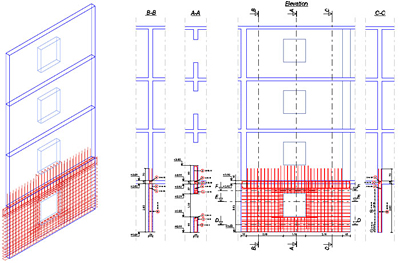
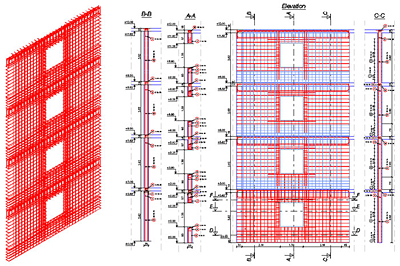
The following figure shows a reinforcement drawing for a wall with an opening. The reinforcement plan contains reinforcements, reinforcement symbols, dimension lines and altitude symbols.

Advance Concrete - Why is 'Copy 3D model' powerful?

For the reinforcement of the walls for the rest of the stories, the “Copy 3D model” option was used. The user selected all the reinforcement bars, reinforcement symbols, dimensions lines and all the altitude dimensions. The 3D copy allows the user to create the 3D reinforcement assembly avoiding all the errors that can occur when using the AutoCAD “Copy” option. In addition, by using this option, the user instantly creates the definition bars and the corresponding distribution bars.

Advance Concrete - Why is 'Copy 3D model' powerful?

In conclusion, by using the “Copy 3D model” option, the user can create reinforcement drawings in a shorter amount of time because the manual insertion of the symbols and dimension lines is avoided. Also the reinforcement 3D model is correctly created.