2012 GRAITEC R&D Awards


This year, GRAITEC presented the 2011 R&D AWARDS to 5 members of the R&D department in Romania. The awards were handed by Francis GUILLEMARD, CEO and founder of the GRAITEC Group, at the 2012 Kick Off, in Bucharest.

The first 2011 Development Award was received by Bogdan ZAVU (Advance Concrete Team Leader) and Emil MOGA (Advance Concrete Senior Software Engineer), for the new DWG export procedure. The DWG export procedure is a key feature of ADVANCE Concrete, which was fully rewritten, resulting in a major speed improvement.

Development Award was received by Cosmin BARBU and Diana SERBANThe second 2011 DEVELOPMENT AWARD was received by Cosmin BARBU (Advance Design Project Manager) and Diana SERBAN (Advance Design Senior Software Engineer), for Crack Analysis, taking into account real reinforcement on beams and columns. Until now, Advance Design was dealing with the required reinforcement with regards to Concrete Design. Version 2012 of the software is making a big step forward, as Advance Design is now helping the user to determine the real reinforcement section and performing EC2 crack analysis.

The engine of Arche Beam was extensively reused and adapted for this project.

TECHNICAL AWARD FOR BEST DEVELOPMENT was received by Mircea KLEPSThe TECHNICAL AWARD FOR BEST DEVELOPMENT was received by Mircea KLEPS (Advance Steel Senior Software Engineer), for the Graitec Modeler as part of the Advance Steel Standalone project. The component was first started by Mihai DOBRESCU and continued by Florin SECUIANU and Mircea KLEPS, Mircea being the one whose fingerprint was decisive for the current engine state-of-the-art status.

In the next step, the component will be used for driving Advance Concrete.

For more information on all the new features of the 2012 GRAITEC Advance suite, please visit the GRAITEC ADVANTAGE page at http://www.graitec.com/en/welcome.asp .

This slideshow requires JavaScript.

Partnership with ROBOBAT Morocco and roadshow in Casablanca


On March 2nd, GRAITEC and ROBOBAT Morocco organized in the seminar room of the “Le Royal Mansour Meridien” hotel in Casablanca (Morocco) a half-day presentationof the GRAITEC Advance BIM solution and particularly Advance Steel (BIM 3D steel detailing software).

Partnership with ROBOBAT Morocco and roadshow in Casablanca Partnership with ROBOBAT Morocco and roadshow in Casablanca

The half-day started with a presentation done by Mr.Soufiane SMAILI (Managing director of ROBOBAT Morocco) of the solutions and partnerships proposed by ROBOBAT Morocco on the Moroccan market.

This event provided the opportunity to announce the partnership between GRAITEC and ROBOBAT Morocco allowing ROBOBAT Morocco to promote and sell Advance Steel on its local market.

Mr. Francis GUILLEMARD (CEO founder of the GRAITEC group) then presented the GRAITEC group and its presence all over the world; he explained the strategic aspect of the partnership and the importance of the Moroccan market for GRAITEC.

Partnership with ROBOBAT Morocco and roadshow in Casablanca Partnership with ROBOBAT Morocco and roadshow in Casablanca

Mr. Babacar CISSE (Business Development Manager for Africa at GRAITEC) then detailed which partners have recently joined GRAITEC to promote the GRAITEC Advance solution on the African continent. Mr.CISSE insisted on the importance to have local motivated and well-trained partners allowing support and proximity assistance.

Partnership with ROBOBAT Morocco and roadshow in Casablanca Partnership with ROBOBAT Morocco and roadshow in Casablanca

The Advance Steel software was demonstrated in detail by Mr. Philippe BONNEAU (Advance Steel Marketing Product Manager) with a “live” presentation of the new release of Advance Steel 2012, an explanation of the benefits and advantages provided to the user and also a focus on the interoperability with the other solutions present on the market (e.g. the successful import of a model from the analysis Robot software into Advance Steel).

Partnership with ROBOBAT Morocco and roadshow in Casablanca Partnership with ROBOBAT Morocco and roadshow in Casablanca

This seminar was a great success with more than 90 Moroccan engineering offices and construction companies, and gave the opportunity of different exchanges during brunch.

Mr. Babacar CISSE comments: “In the direct continuation of the geographical expansion of the solutions developed by the GRAITEC Group, Morocco is part our strategy and we are very happy to welcome ROBOBAT Morocco in our distribution channel of partners.

GRAITEC ADVANCE 2012 Version is released!


1st multi-platform version for the GRAITEC Structural BIM suite


GRAITEC Advance 2012 is released!


NEW CAD SYSTEM for Advance Steel


Major PERFORMANCE IMPROVEMENTS for Advance Concrete


NEW DESIGN CODES including timber design for Advance Design


GRAITEC Advance, aims primarily to improve the productivity of its users, help them reduce design errors and increase the quality of project documentation. The GRAITEC Advance suite is for the most demanding professionals and its ergonomics are designed to make it easy to learn and use.

The Advance suite is based on the implementation of a digital model (BIM / Building Information Model). This technology associates each real object to its virtual equivalent in the digital model and users have the opportunity to simulate the behavior of the real structure and automate many processes. With open BIM standards, Advance can also be used with the Autodesk Revit suite for the structural analysis and design and document creation of models created in Revit.

Version 2012 represents a key milestone in the development of GRAITEC. In fact, the new Advance Steel software architecture allows it to work without an AutoCAD license. This innovation frees up AutoCAD licenses for other uses in the design offi ce. In addition it offers an economic advantage to companies without AutoCAD licenses or that do not have updated AutoCAD licenses.

Major investments were made to simplify usability and improve the performance of our solutions. GRAITEC also continues to introduce new design codes to meet the productivity and quality demands required by a market increasingly more international.

GRAITEC Advance Webinars in December


Structural Engineers, Steel and Concrete Detailers…discover how to gain productivity and reduce errors with our BIM software

Advance Design: Professional Finite Element Analysis Software according to European standardsDiscover the implementation of Eurocodes in Advance Design
Tuesday, December 6th, 2011
     From 9:00 am to 9 :30 am CET
     From 5:00 pm to 5 :30 pm CET
Advance Concrete: Professional Reinforced Concrete Design Software Solution for AutoCADFrom the Architect 2D drawing to the 3D modeling with Advance Concrete
Wednesday, December 7th, 2011
     From 9:00 am to 9 :30 am CET
     From 5:00 pm to 5 :30 pm CET
Advance Steel: Professional Steel Detailing Software Solution for AutoCADEfficient tools for stairs and railings with Advance Steel 
Thursday, December 8th, 2011
     From 9:00 to 9:30 CET
     From 5:00 to 5:30 CET

BIM GRAITEC Advance provides designers and detailers with an optimal working environment with tools to create and completely carry out their construction projects: optimization of construction materials, elimination of project inconsistencies, faster study turnaround time, automatic document creation, project history and tracking, fluid communication with project partners.

Graitec Advance suite compliant with Autodesk Revit 2012


GRAITEC Advance compliancy with REVIT 2012GRAITEC Advance compliancy with REVIT 2012GRAITEC announces the compliancy of its Structural BIM solution suite, GRAITEC Advance, with Autodesk Revit® 2012.

Specifically designed for engineering firms, design offices, detailers and draftsmen, the GRAITEC Advance suite consists of Advance DesignAdvance Concrete and Advance Steel. It provides a complete environment for designing, detailing and creating all design and fabrication documents for reinforced concrete, steel and timber structures.

In an environment where designers are subjected to increasing pressure for optimizing material and costs, reducing the design time, controlling the risks of implementation and integration of new constraints, particularly related to the environment, the response of software developers, particularly of GRAITEC, must be innovative and efficient.

As an important player of digital modeling in the field of construction, GRAITEC continues to enhance its modeling and automation tools based around the digital model, now commonly known as BIM (Building Information Modeling). This technology associates each real object to its virtual equivalent in the digital model, and thus opens the possibility for users to simulate the behavior of the real structure and automate many processes. It also allows the different players to exchange digital information, improving the traceability of information and reduce the design risks. This leads to the compatibility of Advance with Autodesk Revit® 2012.

This integration allows users of Autodesk Revit Architecture® 2012 and Autodesk Revit Structure® 2012 quickly optimize the design of their structures in accordance with U.S. standards and Eurocodes and to produce effective and error-free general arrangement drawings for reinforced concrete in addition to all fabrication drawings, BOMs, and NC files for steel construction. It also reduces the potential risk of errors with changes during the project.

According to Manuel Liedot, GRAITEC Group Product Manager: “This integration makes the work of our users easier. It allows them to automate the design, calculation, and creation of fabrication documents using data from architects or engineering firms using Revit tools.

GRAITEC Advance compliancy with REVIT 2012

Model of mixed Concrete-Steel structure imported from Revit Structure 2012 into GRAITEC Advance

GRAITEC Advance compliancy with REVIT 2012

Model of mixed Concrete-Steel structure in Revit Structure 2012

Convert a reinforcement cage to 3D solids and export it to a dwf file


Advance Concrete provides the option to get a single “dwf” file which contains reinforcement elements and the structural model. This file is necessary for importing the structural model into other software like “Autodesk Navisworks“.
The “dwf” file can be created by following two steps:

How is a reinforcement cage with or without formwork converted to 3D solids and exported to a dwf file?

For this example, consider that some structural reinforcements were reinforced using some dynamic solutions.
The first step is to create a file that contains reinforcement bars as ACIS 3D solids.

First, select all the existing entities. These elements can be selected using the “Select by type” option, found on Advance Concrete‘s Pilot. The entities can also be selected by using AutoCAD®’s “Quick select” tool, or by using Ctrl+A.

How is a reinforcement cage with or without formwork converted to 3D solids and exported to a dwf file?

How is a reinforcement cage with or without formwork converted to 3D solids and exported to a dwf file?

After all the elements are selected use the “Start 3D viewer” function on the “Advance reinforcement 3D viewer” toolbar.

How is a reinforcement cage with or without formwork converted to 3D solids and exported to a dwf file?

If the model is not completely reinforced (some structural elements are missing reinforcement), Advance Concrete displays a warning message.

How is a reinforcement cage with or without formwork converted to 3D solids and exported to a dwf file?

Using the 3D viewer dialog window, select the third option “Export to DWG file with 3D solids“.

How is a reinforcement cage with or without formwork converted to 3D solids and exported to a dwf file?

If the newly created file is opened in pure AutoCAD®, we will see that the structural elements are made only from simple AutoCAD® lines, while only the reinforcement bars are 3D solids.

The second step is to convert the structural elements into 3D solids and copy them over the elements from the drawing created using the “3D Viewer” function.
To convert all the structural elements into AutoCAD® solids, select the entities and use the “Convert a structural element into ACIS solid entity” function, on the “Advance Model” toolbar.

How is a reinforcement cage with or without formwork converted to 3D solids and exported to a dwf file?

This function also provides the option to keep or erase the original structural elements.

How is a reinforcement cage with or without formwork converted to 3D solids and exported to a dwf file?

After using this option, copy all the ACIS solids by picking a base point. With the help of the base point the AutoCAD® solids will perfectly overlap the reinforcement entities that were obtained in step 1.

How is a reinforcement cage with or without formwork converted to 3D solids and exported to a dwf file?

Paste the elements in the step 1 drawing by choosing the same base point.
Using the “Quick select” tool select all the AutoCAD® simple lines and delete them.

How is a reinforcement cage with or without formwork converted to 3D solids and exported to a dwf file?

In the end, a drawing is obtained which contains only AutoCAD® 3D solids. This drawing can be exported as a “dwf” file, and imported in other software like “Autodesk Navisworks“.

How is a reinforcement cage with or without formwork converted to 3D solids and exported to a dwf file?

Advance webinars


Structural Engineers, Steel and Concrete Detailers…discover how to gain productivity and reduce errors with our BIM software

Advance Steel: Professional Steel Detailing Software Solution for AutoCAD Advance Steel 
Tuesday, October 25th, 2011
    from 10:00 to 10:30 CET
    from 17:00 to 17:30 CET
Advance Concrete: Professional Reinforced Concrete Design Software Solution for AutoCAD Advance Concrete 
Wednesday, October 26th, 2011
    From 9:00 am to 9 :30 am CET
    From 5:00 pm to 5 :30 pm CET
Advance Design: Professional Finite Element Analysis Software according to European standards Advance Design 
Thursday, October 27th, 2011
    From 9:00 am to 9 :30 am CET
    From 5:00 pm to 5 :30 pm CET

BIM GRAITEC Advance provides designers and detailers with an optimal working environment with tools to create and completely carry out their construction projects: optimization of construction materials, elimination of project inconsistencies, faster study turnaround time, automatic document creation, project history and tracking, fluid communication with project partners.

Advance Concrete 2011 SP1 – Improved performance and stability


With Advance Concrete 2011 Service Pack 1, most functions’ speed was significantly increased compared to the 2010 version. Among these improvements: 

Advance Concrete 2011 - Start up speed   Start up speed  
The Startup speed is significantly improved. With SP1, AC starts ~3.5 times faster than AC 2010.
Advance Concrete - time to load an existing file decreased with SP1   Loading files  
The time to load an existing file decreased with SP1. Loading a file is 2 to 3 times faster than in AC2010 (the effect is even more visible with large files!).
Advance Concrete - Creating a new AC DWG file faster   Creating a new AC DWG file  
Creating a new empty AC DWG file is ~10 times faster than AC2010.
Advance Concrete - Faster reinforcement drawing creation   Creating reinforcement drawings  
The reinforcement drawing creation is ~3.5 times faster than in AC2010.
The performance test was performed with several basic structural elements with predefined reinforcement styles.
Advance Concrete - Faster reinforcement list update   Reinforcement list update  
The reinforcement list update speed is ~3 times faster than in AC2010.
Advance Concrete - Export drawings and layouts to DWG   Export drawings and layouts to DWG  
Export up to 20 types of views and layouts ~1.5 times faster than in AC2010.

Advance compliant with AutoCAD® 2012


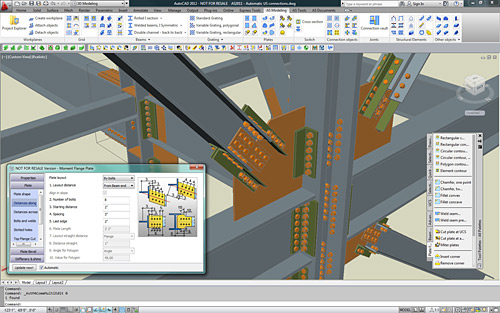
Advance is compliant with AutoCAD 2012Advance is compliant with AutoCAD 2012GRAITEC  announces the compliancy of Advance Steel andAdvance Concrete with AutoCAD® 2012 and AutoCAD Architecture® 2012.

Advance Steel and Advance Concrete are part of the GRAITEC structural BIM solution, and have been developed for design offices, building industries, steel and concrete detailers.

Advance Steel is specifically designed for structural engineers and steel detailers who require a professional and easy-to-use BIM structural steel detailing software that automates the creation of workshop drawings, general arrangement drawings, BOMs and NC files.

Advance Concrete is specifically designed for structural engineers and reinforced concrete detailers who require professional and easy-to-use BIM software that automates the production of formworks and reinforcement drawings, BOMs and NC files.

Advance compliant with AutoCAD 2012

AutoCAD® 2012 enables the quick creation of documents from a variety of modeling formats, helping to reduce manual documentation workarounds. Capture and import as-built information to jump-start your design process. Plus, you’ll find a wide range of timesaving enhancements to the features you use most. AutoCAD® 2012 delivers the powerful tools you need to participate in smooth 3D design workflows, helping drive your projects to completion more quickly than ever before.

With new and expanded workflows for 3D conceptual design, model documentation, and reality capture, AutoCAD® 2012 helps design professionals maximize productivity.


Why is ‘Copy 3D model’ powerful?


With the “Copy 3D model” option, Advance Concrete provides a more rapid and efficient work environment for the user to create reinforcement drawings. To create a complete reinforcement drawing involves not only creating the reinforcement bars, but also creating the symbols and the dimensions lines relative to the formwork.

Using the “Copy 3D model” option the user has the advantage of copying all the specific symbols along with the reinforcement bars. Another advantage is that the copied reinforcement bars are automatically displayed in all the other plan views. Using this option, the user creates a correct 3D model, avoiding many copy errors.

All the reinforcement bars must be created along with all the designated symbols and the formwork dimension lines. The “Copy 3D model” option can be used for all the similar structural elements from the drawing. The user must choose a reference point and then copy the multiple entities for each structural element.

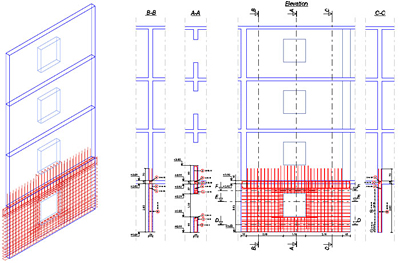
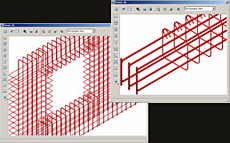
The following figure shows a reinforcement drawing for a wall with an opening. The reinforcement plan contains reinforcements, reinforcement symbols, dimension lines and altitude symbols.

Advance Concrete - Why is 'Copy 3D model' powerful?

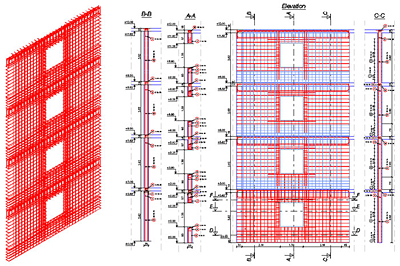
For the reinforcement of the walls for the rest of the stories, the “Copy 3D model” option was used. The user selected all the reinforcement bars, reinforcement symbols, dimensions lines and all the altitude dimensions. The 3D copy allows the user to create the 3D reinforcement assembly avoiding all the errors that can occur when using the AutoCAD “Copy” option. In addition, by using this option, the user instantly creates the definition bars and the corresponding distribution bars.

Advance Concrete - Why is 'Copy 3D model' powerful?

In conclusion, by using the “Copy 3D model” option, the user can create reinforcement drawings in a shorter amount of time because the manual insertion of the symbols and dimension lines is avoided. Also the reinforcement 3D model is correctly created.


Advance Concrete Dynamic Reinforcement


Creation of the reinforcement drawing is an important step in designing reinforced concrete buildings, which usually involves a lot of time, patience, skills and responsibility, as the created drawings should comply with specific standards.
Advance Concrete has a new reinforcement solution, easy to use in projects, so that the time spent for reinforcement drawing creation is considerably reduced.

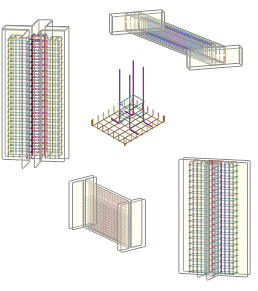
1. Predefined dynamic reinforcement solutionsAdvance Concrete: Dynamic reinforcement

  • Cantilever beams
  • Columns (stirrups and pin bars)
  • Door and window openings
  • Wall between two columns
  • Plain wall between walls

2. Flexibility in defining new dynamic reinforcement solutions
Advance Concrete provides:

  • A user friendly environment for reinforcement solution design
  • Various tools for the creation of all reinforcement elements necessary for the reinforcement cage
  • A wizard for saving the dynamic reinforcement solution

3. Easy to use

  • Automatic creation of a drawing from a set of structural elements. The drawing contains predefined views
  • Adding reinforcement elements using the Advance Concrete tools
  • Saving the reinforcement solution in an interactive mode

4. Reusing the reinforcement solutions
All reinforcements put in place using the “Dynamic Reinforcement” automatically adapt to formwork contours and can be taken into account in reinforcement drawing creation and lists.

5. 3D ViewAdvance Concrete: Dynamic reinforcement
Based on the reinforcement representation in the views of the reinforcement drawing, Advance Concrete recreates the cage and displays it in 3D. It also detects collisions.

Benefits

  • The dynamic reinforcement solutions can be easily used in projects, so that the time spent for reinforcement drawings creation is considerably reduced. Common tasks, frequently encountered during the project development are simplified and reduced to simple parameter value input.
  • Once defined and saved, the dynamic reinforcement solutions can be applied in other projects; this minimizes the risk of errors and guarantees compliance with design rules and standards.
  • The drawings are kept up-to-date when projects are modified, and the risk of errors is considerably reduced.

Read full article here


Advance Concrete – Reinforcing load bearing walls


Advance Concrete provides advanced reinforcement solutions, useful in designing reinforced concrete buildings so that the time spent for creation of the reinforcement drawings is considerably reduced.

Nowadays, many private or office buildings are built using load bearing walls as main supporting elements. In a vertical plane, the load bearing walls have a large capacity of processing gravitational loads, which recommends them for buildings with several levels, in seismic areas. On the other hand, in a perpendicular direction on the wall plane, the load bearing walls provide small resistance to horizontal forces and usually are supported by perpendicular walls or similar structures.

In this article you will read about:

  • Fast creation of all reinforcement elements
  • Automatic creation of a drawing
  • Adding reinforcement elements
  • Defining formulas when saving the solution

Click here to read full article