Advance Concrete 2011 SP1 – Improved performance and stability


With Advance Concrete 2011 Service Pack 1, most functions’ speed was significantly increased compared to the 2010 version. Among these improvements: 

Advance Concrete 2011 - Start up speed   Start up speed  
The Startup speed is significantly improved. With SP1, AC starts ~3.5 times faster than AC 2010.
Advance Concrete - time to load an existing file decreased with SP1   Loading files  
The time to load an existing file decreased with SP1. Loading a file is 2 to 3 times faster than in AC2010 (the effect is even more visible with large files!).
Advance Concrete - Creating a new AC DWG file faster   Creating a new AC DWG file  
Creating a new empty AC DWG file is ~10 times faster than AC2010.
Advance Concrete - Faster reinforcement drawing creation   Creating reinforcement drawings  
The reinforcement drawing creation is ~3.5 times faster than in AC2010.
The performance test was performed with several basic structural elements with predefined reinforcement styles.
Advance Concrete - Faster reinforcement list update   Reinforcement list update  
The reinforcement list update speed is ~3 times faster than in AC2010.
Advance Concrete - Export drawings and layouts to DWG   Export drawings and layouts to DWG  
Export up to 20 types of views and layouts ~1.5 times faster than in AC2010.

Cluj Arena Stadium


Cluj Arena stadium aims to be one of the most modern stadiums in Romania. The project must be completed this autumn.
The construction is at the location of the old Ion Moina stadium. With a capacity of over 30.200 seats, the developers say this is more than a stadium: it is the biggest sports and leisure center in Romania, with a shopping and dining area as well.
The initial project underwent several changes: the total capacity of the arena has reached 44.000 m2 (from 22.000 m2) and the running track will have eight lanes, not six, as initially expected.

It is more than a stadium; it is the new landmark of the city, in which we managed to capture the passion, the emotions and most of all spirit of fair-play” Mr. Florin Dico

Construction company: Dico and Tiganas Office Design Cluj-Napoca
Design office:
Cluj-Napoca Technical University,
Dico and Tiganas Office Design Cluj-Napoca,
Bogart Construct Cluj-Napoca,
DAS Engineering Group

This slideshow requires JavaScript.

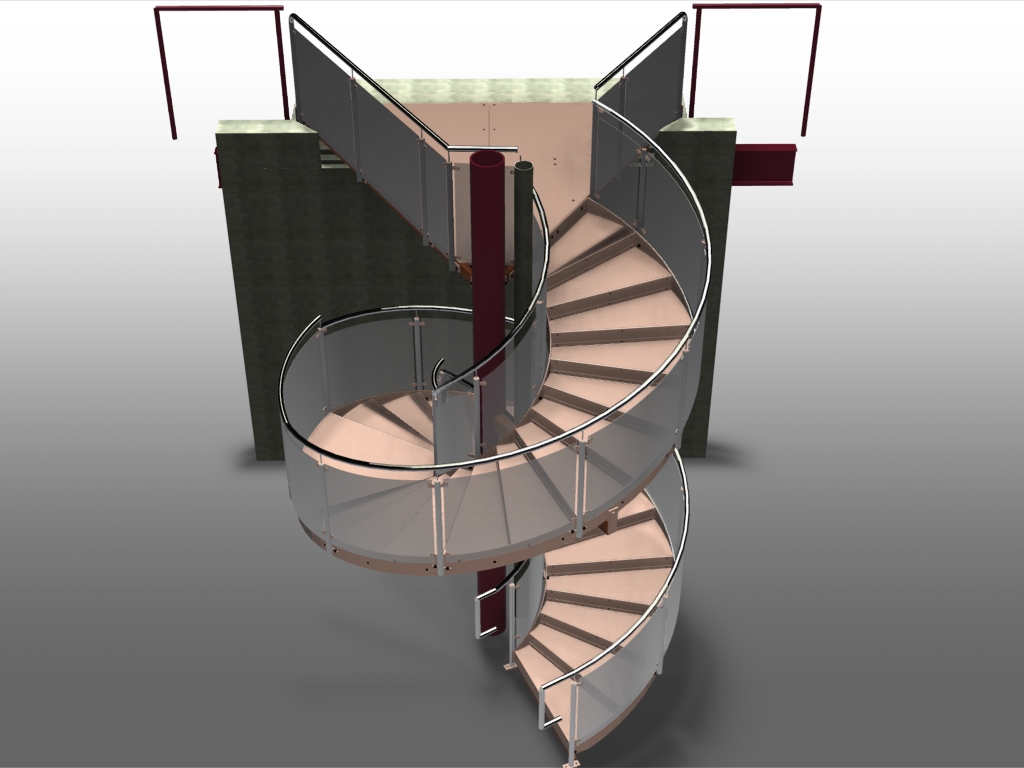
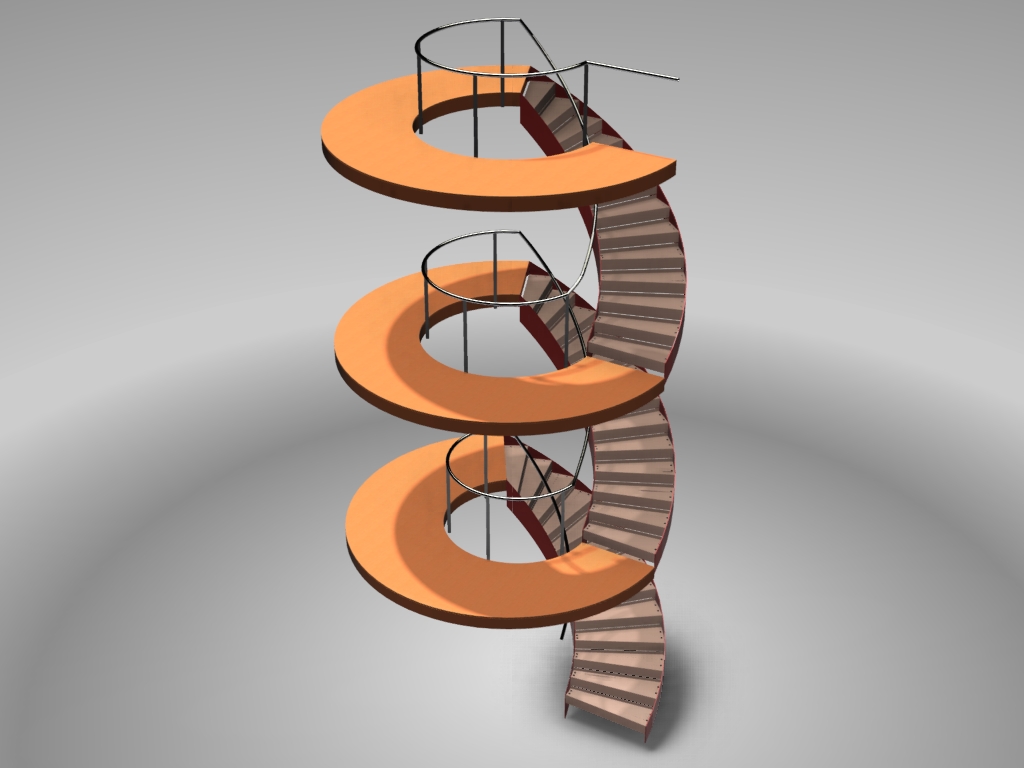
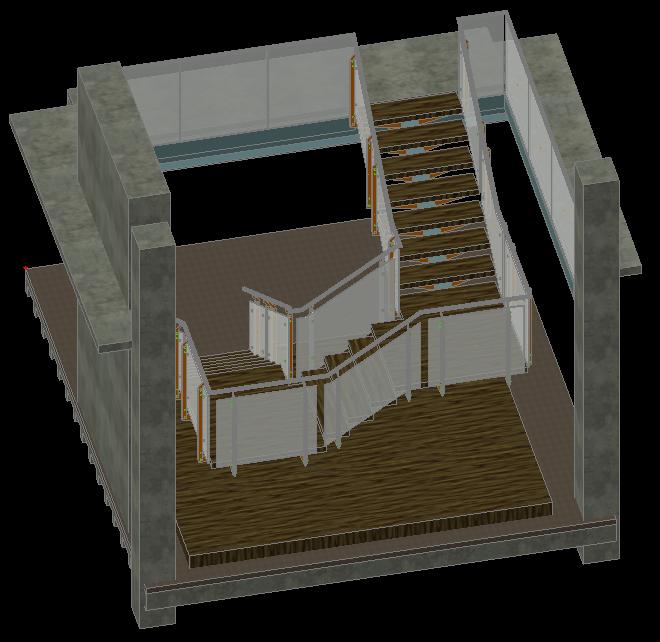
Stairs in Advance Steel


With its advanced feature set, Advance Steel supports the design of complex structures such as straight and spiral stairs, railings, cage ladders, etc. Advance Steel creates all necessary documents (including NC files) for the stair fabrication using a user selected template. The stair can be modified using numerous profile types for stringers, various connection types between the treads and the stringers. Advance Steel offers a large library of tread types and railings, but the user can also define its own tread type that can be stored in the library for future use.

Here are some examples of stairs created in Advance Steel by our customers:
Advance Steel Stairs Advance Steel Stairs Advance Steel StairsAdvance Steel Stairs Advance Steel StairsAdvance Steel StairsAdvance Steel StairsAdvance Steel Stairs
Advance Steel StairsAdvance Steel StairsAdvance Steel StairsAdvance Steel Stairs Advance Steel StairsAdvance Steel StairsAdvance Steel Stairs

Advance compliant with AutoCAD® 2012


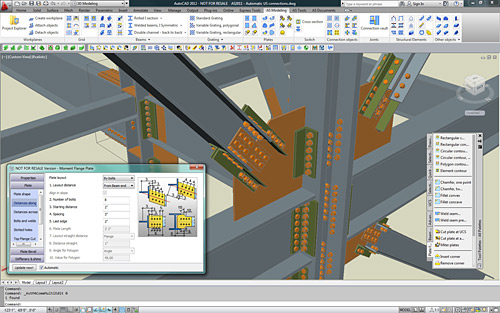
Advance is compliant with AutoCAD 2012Advance is compliant with AutoCAD 2012GRAITEC  announces the compliancy of Advance Steel andAdvance Concrete with AutoCAD® 2012 and AutoCAD Architecture® 2012.

Advance Steel and Advance Concrete are part of the GRAITEC structural BIM solution, and have been developed for design offices, building industries, steel and concrete detailers.

Advance Steel is specifically designed for structural engineers and steel detailers who require a professional and easy-to-use BIM structural steel detailing software that automates the creation of workshop drawings, general arrangement drawings, BOMs and NC files.

Advance Concrete is specifically designed for structural engineers and reinforced concrete detailers who require professional and easy-to-use BIM software that automates the production of formworks and reinforcement drawings, BOMs and NC files.

Advance compliant with AutoCAD 2012

AutoCAD® 2012 enables the quick creation of documents from a variety of modeling formats, helping to reduce manual documentation workarounds. Capture and import as-built information to jump-start your design process. Plus, you’ll find a wide range of timesaving enhancements to the features you use most. AutoCAD® 2012 delivers the powerful tools you need to participate in smooth 3D design workflows, helping drive your projects to completion more quickly than ever before.

With new and expanded workflows for 3D conceptual design, model documentation, and reality capture, AutoCAD® 2012 helps design professionals maximize productivity.


Keep track of changes during the project revision stage


Often, during the review stage of a project, different changes might be necessary such as:
– New details (views) added on the drawing to provide additional information
– Model modifications such as element geometry, element position, material, new elements

Model modifications affect the existing drawings. Since there are several people involved in the review process, it is useful to keep track of the changes made.

 Standard practice 

According to standard practice in maintenance of engineering drawings, changes made in the model during the review stage of a project are identified using a number or a letter code and are listed in the revision table on the affected drawing. For each revision level, the revision table lists the reviewer (author) and a short description of the change made. Additionally, revision clouds are used to draw attention on modified areas of the drawing.

 CAD techniques 

Using simple CAD software, the elements are modified and revision clouds are drawn manually – a task that requires patience and significant attention to mark and then locate the changes in the drawing. The revision table is drawn using simple entities (lines and text) and updated manually. Additionally, a document management system can be used for drawing revision control.

 Advance Steel – Easier revision management 

Detailing software like Advance Steel allows keeping track of the changes in drawings similar to traditional revision control, but with a lot of improvements in the workflow:

  • Drawing update
  • History and backups
  • Tracking of changes in the revision table
  • Marking changes using revision clouds

Read more here

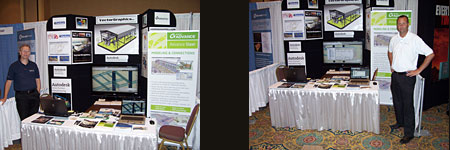
Advance Steel American team at the Tri-State Engineering Society Conference in Florida


The Louisiana Engineering Society was hosting the Tri-State Engineering Society Conference at the Sandestin Golf Beach and resort in Florida June 26-29 and Benoit Lalonde from GRAITEC Canada was present and shared a demo booth with GRAITEC reseller Vector Graphics. The attendees included Structural, Construction, Civil, Mechanical and Safety engineers. These engineers represent private practice, Industry, government, education, and construction from states of Louisiana, Alabama, Mississippi and Florida.

GRAITEC at Tri-State Engineering Society Conference
The conference was a success and GRAITEC was able to give out information and demos of Advance Steel 2011 to interested prospects.

New Valenciennes Stadium modeled with Advance Steel


The new stadium in Valenciennes, France, is located near the original one, and has a 25000-person capacity. It is meant to host the Valenciennes Anzin Football Club’s games. ETI Design Office, which has experience in designing several stadiums, is in charge of this project. In addition to the project’s size, the expectations of the Architecture’s Office – with the major constraint of not letting any bolts appear on the steel structure – have called for the use of Advance Steel for easy fabrication and erection at site without errors.

The conception of the new Valenciennes Stadium has required the expertise of ETI Design Office, which managed the complete study of the Alps stadium of Grenoble (France) in 2006 and worked on the extension of Marcel Picot stadium in Nancy in anticipation of the Euro 2016 football cup that will take place in France. The size of the project required four people working full-time on it: one Project Manager, Mr Fabrice Grisot, one Construction Engineer, Mr Stéphane Dottori, and two draftsmen.

  About the use of Advance Steel  

ETI started using AutoCAD® to draw the first lines of the project in 2D and submit it to the contracting owners. The project owner and architect’s need to view more precise details in 3D about the most complex assemblies required the use of Advance Steel, which has a Building Information Modeling (BIM) approach.

With the flexibility of its numerous tools, Advance Steel enabled fast modeling of all steel structural elements, whether by using integrated libraries of standard sections or by using the automatic conversion tool that allows converting AutoCAD® elements into polygonal plates.

  A steel structure without any visible bolts  

In order to follow the architect’s wish to have no visible bolts on the structure once the construction is erected, ETI had to design assemblies early from the study phase. Thus, bolted assemblies were designed to ease the transport of parts (that can reach a weight of 10 tons each) and the parts were welded together at site with fastening plates. The welds were then painted and grinded to get a perfect aspect. Therefore, it was necessary to model many weld preparation chamfers on the edges of the plates and the profiles to get a realistic result and, most of all, for these elements to appear clearly on the fabrication drawings.

From the 3D model that is automatically numbered, Advance Steel allowed the automatic creation of all fabrication and assembly drawings, with all the necessary labels and dimensions for the workshop. In addition to the drawings generated as DWG files that can be easily read by the architect, the steel parts could be directly transferred as DSTV and DXF files to the CNC machines located in the workshop of a subcontractor in charge of the fabrication of the structure.

  Assembling the steel structure without errors  

The assembly drawings generated from the 3D model included all the necessary 2D and 3D views for the assembly teams to perfectly understand everything at site. Since all verifications of clash detection were applied on the Advance Steel digital 3D model, no adaptations at site were needed during the erection of the structure.

This slideshow requires JavaScript.

Musée des Confluences – designed with Advance Design


Lyon Confluences is a major urban project including residential buildings, offices, a leisure centre, the Regional Hall and the Confluences Museum. POLYBATIC Design Office, in charge of the computing of the Museum’s concrete structure, chose Advance Design to carry out this ambitious and complex project. The software enabled the Design Office to solve cooperation issues with other Offices which were using different software solutions.

The architecture contest that took place in 2001 was won by the Viennese Office Coop_Himmelbau with a complex and ambitious project called “Crystal-cloud”, a building supported by stilts featuring a combination of a steel sphere and a sharp glass roof. For POLYBATIC, this meant designing 14 monumental variable columns, 15 to 20 meters each, and 3 bracing hollow-piles holding the steel structure of the “cloud”. The technical part is located in the base which features two floors with its upper part being the public forecourt. Moreover, each column supports between 2000 and 6000 tons, 670 tons of horizontal loads are distributed on the beams and 1260 tons on the piles. POLYBATIC used Advance to model the concrete elements of the Museum, integrating other elements from the general design model of the project.

The number of Design Offices involved brings more complexity to the project, with, among others, JAILLET-ROUBY in charge of the general model and the steel frame, and the POLYBATIC/PLANTIER group designing the concrete elements.

The use of Advance Design allowed fast computing of the final vertical load distribution from the existing planting, it enabled the 3D modeling of this complex project and the integration of elements designed by other Offices.

M. Gérard DELLA DORA, Managing director of POLYBATIC Design Office and Representative for the Concrete Design Offices group working on the Musée des Confluences: “Each Design Office work with different software solutions and this can be problematic. (…) We were expecting collisions between our “source” model and other Offices’ “clone” models, with regards to the impossibility of making direct exports. Therefore we have proceeded to make some tests for a preliminary validation, and we were pleasantly surprised to see that the differences were minor. Advance Design (…) is a modern program that is perfectly suitable for this type of project. Its main benefit is to be able to model a project as a whole. GRAITEC solutions are high-performance tools that allow us to save precious time, be more competitive and dedicate our energy to the conception and the optimization of the projects.” 


This slideshow requires JavaScript.

GRAITEC R&D center acquires Microsoft Gold Independent Software Vendor status


GRAITEC is pleased to announce that its subsidiary GRAITEC Romania received the status of Gold Independent Software Vendor.

GRAITEC R&D center acquires Microsoft Gold ISV

At the beginning of June 2011, the R&D center of the GRAITEC Group, GRAITEC Romania, has renewed its status as a partner for Microsoft, by receiving the Gold Independent Software Vendor competency.

Of the 640,000 organizations included in the Microsoft Partner Network, only 1% of them have a Gold diploma. Therefore, GRAITEC is part of a very short list of partners around the world, who have achieved this high degree of competency.

This certification comes as an addition and also an acknowledgment of the expertise, experience and performance of GRAITEC software solutions, based on recent Microsoft technologies. GRAITEC Advance software solutions passed the compatibility tests for Microsoft Windows 7 since October 2010, obtaining the compliancy logo: “Compatible with Windows 7”.

As a Certified Microsoft Gold Partner, GRAITEC proves once again the exceptional technical skills, and continuing concern to ensure and increase customer satisfaction. Through the collaboration with Microsoft, GRAITEC aims to offer its customers significant benefits to support its business development and provide a genuine competitive advantage.

Ionel DRAGU, GRAITEC R&D Director, comments: We received the Gold ISV certification because our software pack is fully compatible with the Microsoft platform. This achievement acknowledges once again the quality of our products based on Microsoft technology

Manuel LIEDOT, GRAITEC Chief Product Officer, comments: Since the success of any company is provided by its ability to adapt to market requirements, this certification proves that our products and services are capable to keep up with new trends. Our mission is to provide a comprehensive and integrated solution to ensure the best performance in building design and civil engineering.

Advance Steel Project: Industrial Plant


Location: East Coast, USA
Design office: Rouleau-Desaulniers

Project description:
Additional equipment supports access platforms for a new engineered wood factory. Total weight: ~340 tons. More than 1350 shop drawings prepared

The fact that Advance Steel is based on AutoCAD® made the 3D modeling of the mechanical equipment and ducting easy. This is necessary to avoid any interference between the mechanical equipment and the structural and miscellaneous elements.
Marc DESAULNIERS, Project Manager, Rouleau-Desaulniers

This slideshow requires JavaScript.

Advance Steel User meeting in Czech Republic


GRAITEC announces that a User meeting was organized by its Czech subsidiary, AB Studio, on June 7th for the Advance Steel users from Czech Republic and Slovakia. The meeting took place at the Institut Slavonice s.r.o. in the historical city of Slavonice.

Jiri Bendl – Managing director of AB Studio – opened the meeting and presented an overview of the business in Czech Republic and Slovakia, but also in the rest of the world.

With AB Studio and GRAITEC SA staff in attendance, the day provided an excellent opportunity to go through detailed presentations of the major features of the new Advance Steel 2011 release, to celebrate the project winners of the latest user contest and also to present some recent impressive projects done with Advance Steel around the world.

This meeting also gave the opportunity to have a presentation of Advance Design and Advance Concrete, which are part of the GRAITEC Advance suite, the structural BIM solution.

Between the different presentations, all participants took some minutes to climb the historical Slavonice old tower, and after the lunch break a tour was organized to visit the modern workshop and the production halls of PKD s.r.o., one of the major users of Advance Steel.

The User meeting was a big success with more than 50 participants and everyone is looking forward to the next User meeting.

This slideshow requires JavaScript.


User meeting in the UK


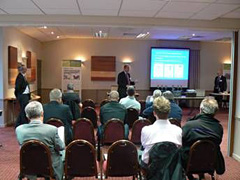
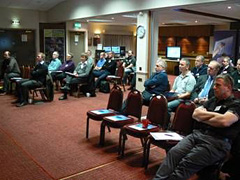
The first UK Advance Steel user group was held by GRAITEC UK in Oxford.

GRAITEC User meeting in the UK

The new features in Advance Steel 2011 were demonstrated and there was an excellent feedback from the 30 delegates which attended this meeting.

GRAITEC User meeting in the UK

A model competition had been proposed organized previously to this user group and 90 projects have been received!
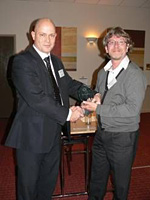
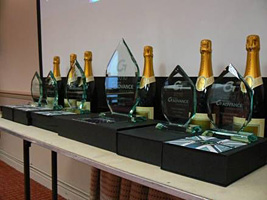
Awards were made under several categories (Structures, Architectural Metalwork, Bridges, Special projects) and the prizes were given by Carl Spalding (GRAITEC UK Business Manager) to all the winners.

Why is ‘Copy 3D model’ powerful?


With the “Copy 3D model” option, Advance Concrete provides a more rapid and efficient work environment for the user to create reinforcement drawings. To create a complete reinforcement drawing involves not only creating the reinforcement bars, but also creating the symbols and the dimensions lines relative to the formwork.

Using the “Copy 3D model” option the user has the advantage of copying all the specific symbols along with the reinforcement bars. Another advantage is that the copied reinforcement bars are automatically displayed in all the other plan views. Using this option, the user creates a correct 3D model, avoiding many copy errors.

All the reinforcement bars must be created along with all the designated symbols and the formwork dimension lines. The “Copy 3D model” option can be used for all the similar structural elements from the drawing. The user must choose a reference point and then copy the multiple entities for each structural element.

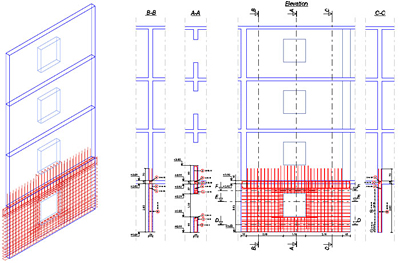
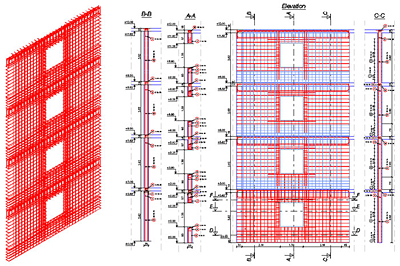
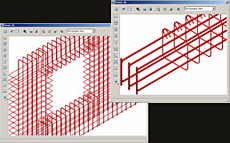
The following figure shows a reinforcement drawing for a wall with an opening. The reinforcement plan contains reinforcements, reinforcement symbols, dimension lines and altitude symbols.

Advance Concrete - Why is 'Copy 3D model' powerful?

For the reinforcement of the walls for the rest of the stories, the “Copy 3D model” option was used. The user selected all the reinforcement bars, reinforcement symbols, dimensions lines and all the altitude dimensions. The 3D copy allows the user to create the 3D reinforcement assembly avoiding all the errors that can occur when using the AutoCAD “Copy” option. In addition, by using this option, the user instantly creates the definition bars and the corresponding distribution bars.

Advance Concrete - Why is 'Copy 3D model' powerful?

In conclusion, by using the “Copy 3D model” option, the user can create reinforcement drawings in a shorter amount of time because the manual insertion of the symbols and dimension lines is avoided. Also the reinforcement 3D model is correctly created.


How to modify the mesh on linear elements


Advance Design provides the option to define a manual mesh on linear elements in order to save time both in modeling and computation.

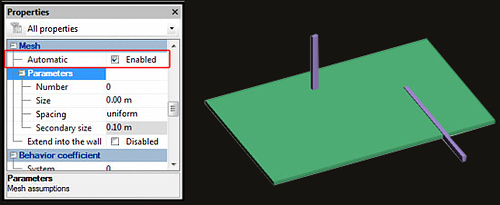
Linear elements mesh: by selecting one or more linear elements and accessing the properties window, all the available options that can be modified are in the Mesh category.

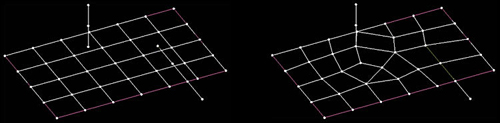
i. Automatic – when this option is active, all the imposed/intersected structural elements will be connected and share common nodes.


How is the mesh on linear elements modified?

Automatic mesh option inactive                                   Automatic mesh option active

How is the mesh on linear elements modified?

ii. Number – by entering a value in this field, the element will be meshed in that number of elements, without considering the value of the general mesh (global mesh options).

iii. Size – in this field a maximum dimension of the mesh is defined (length units); by applying a uniform spacing with a maximum dimension of “m”, the mesh will look as the following figure:

iv. Spacing – this option is directly connected to Size and Secondary Size; when any of the other available options, besides uniform spacing, is used then this field must be completed.

v. Secondary size – this field is the minimum dimension which will take into account the type of the spacing selected.

How is the mesh on linear elements modified

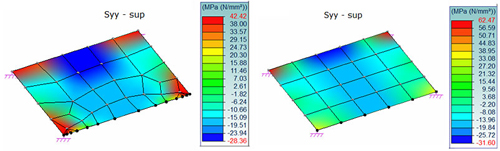
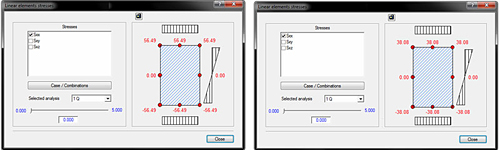
Sxx stresses on linear element at extremity “i”

How is the mesh on linear elements modified

vi. Extend into the wall – when a beam is supported by a wall (in the longitudinal direction), activating this option will create a rigid connection between the wall and the beam.


Read full article here

Advance Concrete Dynamic Reinforcement


Creation of the reinforcement drawing is an important step in designing reinforced concrete buildings, which usually involves a lot of time, patience, skills and responsibility, as the created drawings should comply with specific standards.
Advance Concrete has a new reinforcement solution, easy to use in projects, so that the time spent for reinforcement drawing creation is considerably reduced.

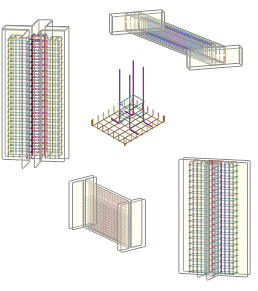
1. Predefined dynamic reinforcement solutionsAdvance Concrete: Dynamic reinforcement

  • Cantilever beams
  • Columns (stirrups and pin bars)
  • Door and window openings
  • Wall between two columns
  • Plain wall between walls

2. Flexibility in defining new dynamic reinforcement solutions
Advance Concrete provides:

  • A user friendly environment for reinforcement solution design
  • Various tools for the creation of all reinforcement elements necessary for the reinforcement cage
  • A wizard for saving the dynamic reinforcement solution

3. Easy to use

  • Automatic creation of a drawing from a set of structural elements. The drawing contains predefined views
  • Adding reinforcement elements using the Advance Concrete tools
  • Saving the reinforcement solution in an interactive mode

4. Reusing the reinforcement solutions
All reinforcements put in place using the “Dynamic Reinforcement” automatically adapt to formwork contours and can be taken into account in reinforcement drawing creation and lists.

5. 3D ViewAdvance Concrete: Dynamic reinforcement
Based on the reinforcement representation in the views of the reinforcement drawing, Advance Concrete recreates the cage and displays it in 3D. It also detects collisions.

Benefits

  • The dynamic reinforcement solutions can be easily used in projects, so that the time spent for reinforcement drawings creation is considerably reduced. Common tasks, frequently encountered during the project development are simplified and reduced to simple parameter value input.
  • Once defined and saved, the dynamic reinforcement solutions can be applied in other projects; this minimizes the risk of errors and guarantees compliance with design rules and standards.
  • The drawings are kept up-to-date when projects are modified, and the risk of errors is considerably reduced.

Read full article here


Advance Steel is compliant with Voortman machinery


Advance Steel is compliant with Voortman machineryDuring the NASCC 2011 steel conference, GRAITEC and VOORTMAN specialists had the opportunity to run a test session of the DSTV-NC files created by Advance Steel.

After the test session ended, the team could conclude the full compliancy of Advance Steel DSTV-NC files with the VOORTMAN machines.

Advance Steel is specifically designed for structural engineers and steel detailers who require a professional and easy-to-use 3D structural steel detailing software that automates the creation of workshop drawings, general arrangement drawings, reports and files for CNC machines.

VOORTMAN has developed over more than 40 years to be one of the world’s leading single source supplier of CNC-controlled machinery for the steel processing industry.

NASCC show in Pittsburgh was a success!


The GRAITEC Advance Steel team exhibited at NASCC, the steel conference in Pittsburgh, Pennsylvania, on May 11-14, 2011.

The show attendance was limited and got off to a slow start but by the time it was over we received an excellent amount of serious leads which will translate into interesting sales…

The US economy is definitely improving and this is good news for all markets.

Congratulations to M. Robert Beauchamps, owner of Datadraft Structural Detailing, (Montreal!) for winning the Advance Steel pro license.

This slideshow requires JavaScript.

Create column heads automatically with Advance Design


From architectural considerations or the desire to give the user more flexibility in organizing the interior space, the usage of a concrete flat slab that is supported directly by concrete columns with flared column heads is a solution that can eliminate many problems. Column heads are used to increase the shear strength of slabs and to reduce the bending moment in the slab by reducing the effective span.

Advance Design 2011 can automatically create “Master – slave” connections between the column head nodes and flat slab nodes.

Thus, while the modeling of a flat slab with column heads was described in a previous article (see: How can we design a flat slab with a column head?), the new feature in Advance Design is intended to ease the work and simplify the creation of column heads. However, certain steps will not be discussed in this document.

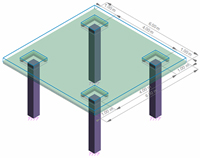
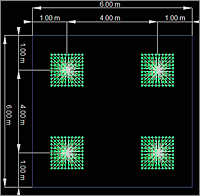
How are column heads automatically createdIn the following example we will consider a flat slab made of C20/25 concrete, with a 15 cm thickness, which is supported by four C20/25 concrete columns (40×40 cm). The column head dimensions will be 90×90 cm and the depth of the head is 25 cm. For calculations we will consider the self weight of the elements and a live load of 5 kN/m2. The size of the mesh element is set to 0.1 meters.

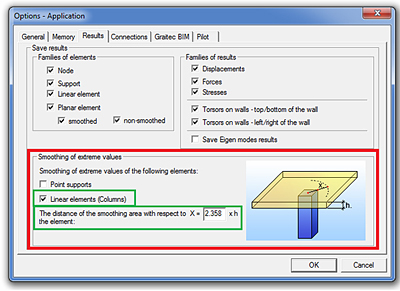
After all elements are modeled, open the “Application” dialog box from the “Options” drop-down menu and select the “Linear elements (Columns)” option. In order to define the correct shape of the column head, “Master – slave” nodes are determined according to the ratio between the “x” distance and the slab thickness (which, in this case, is 15 cm).

How are column heads automatically created

When the “Mesh” is done, it can be seen that the “Master – slave” connections were done automatically.

How are column heads automatically created

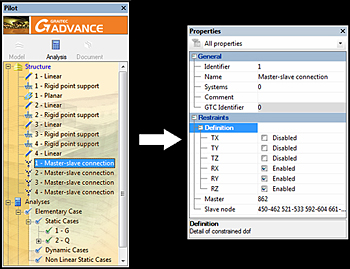
You can modify the degrees of freedom for each “Master – slave” connection in the “Properties” window.

How are column heads automatically created

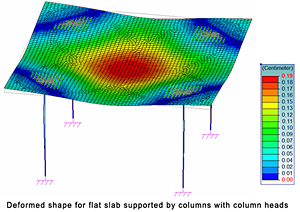
The results can be processed after the Finite Element Analysis is done.

How are column heads automatically created

GRAITEC at BuildTech Asia 2011


As part of the Singapore Construction Productivity week, and in conjunction with the Build Smart Conference, the BuildTechAsia2011 International Building Expo is a major event in Asia. This year the main topic was “Redefining the Future of Construction”. The inaugural BuildTechAsia 2011 Exhibition has presented the latest in technologies across varied segments of the building and construction industry. GRAITEC has exhibited and presented its Advance solutions and Building Information Modeling (BIM) concepts.

This slideshow requires JavaScript.

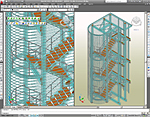
Advance Steel – Stairs and Railings


With its advanced feature set, Advance Steel supports the design of complex structures such as straight and spiral stairs, railings, cage ladders, etc. Advance Steel creates all necessary documents (including NC files) for the stair fabrication using a user selected template.

Quick and easyAdvance Steel: Stairs - Quick and easy
Once the user selects 2 points, the stair with its stringer and treads (including connection to the stringer) is created.
The tread distances are calculated using a standard formula for determining the ergonomic height and length of the step.

The stair can be modified using profile types for stringers, connection types between the treads and the stringers, lower and upper landing

Instant railings
Once the stringers are selected, the railings are created using the user defined start and end points.
Railings of any type can then be modified. Features include:

  • Profile types for posts, handrail and kickrail
  • Controlled positioning of posts, top handrail, middle handrail and kickrail
  • Connection between posts and stringers
  • And more…

If the stair length and width are modified the railing is automatically updated!

Spiral stairs
Using the Advance Steel advanced tools, with a few clicks defining the height, the tread width and direction, the entire stair can be created. Various options are available:

  • Large library of tread types
  • Treads can be welded to the central post or connected by a profile or a bolted plate
  • And moreAdvance Steel: Stairs - Spiral stairs

Cage ladders
All elements of a cage ladder are inserted by two points defining the height. The number of rungs can be defined or calculated according to the distance between the rungs. The user can modify then the shape and the size of the elements.

Easy to customize 
Stairs and railings can be customized through the Properties dialog box.
The tabs of the Properties dialog box are grouped in logical categories to simplify the use of this powerful feature.
The user can modify the parameters (dimensions, treads types, connection types, etc.) to get the required structure. All modifications are visible in the model as they happen.

Automatic drawings
Once the stair is modeled, the user may select a template for the workshop drawing. Advance Steel then creates all the necessary documents (including NC files) for the stair fabrication. The drawings are automatically labeled and dimensioned. The user can customize the drawing layout using the Drawing Style Manager.

Read full article