GRAITEC Advance Webinars in December


Structural Engineers, Steel and Concrete Detailers…discover how to gain productivity and reduce errors with our BIM software

Advance Design: Professional Finite Element Analysis Software according to European standardsDiscover the implementation of Eurocodes in Advance Design
Tuesday, December 6th, 2011
     From 9:00 am to 9 :30 am CET
     From 5:00 pm to 5 :30 pm CET
Advance Concrete: Professional Reinforced Concrete Design Software Solution for AutoCADFrom the Architect 2D drawing to the 3D modeling with Advance Concrete
Wednesday, December 7th, 2011
     From 9:00 am to 9 :30 am CET
     From 5:00 pm to 5 :30 pm CET
Advance Steel: Professional Steel Detailing Software Solution for AutoCADEfficient tools for stairs and railings with Advance Steel 
Thursday, December 8th, 2011
     From 9:00 to 9:30 CET
     From 5:00 to 5:30 CET

BIM GRAITEC Advance provides designers and detailers with an optimal working environment with tools to create and completely carry out their construction projects: optimization of construction materials, elimination of project inconsistencies, faster study turnaround time, automatic document creation, project history and tracking, fluid communication with project partners.

Graitec Advance suite compliant with Autodesk Revit 2012


GRAITEC Advance compliancy with REVIT 2012GRAITEC Advance compliancy with REVIT 2012GRAITEC announces the compliancy of its Structural BIM solution suite, GRAITEC Advance, with Autodesk Revit® 2012.

Specifically designed for engineering firms, design offices, detailers and draftsmen, the GRAITEC Advance suite consists of Advance DesignAdvance Concrete and Advance Steel. It provides a complete environment for designing, detailing and creating all design and fabrication documents for reinforced concrete, steel and timber structures.

In an environment where designers are subjected to increasing pressure for optimizing material and costs, reducing the design time, controlling the risks of implementation and integration of new constraints, particularly related to the environment, the response of software developers, particularly of GRAITEC, must be innovative and efficient.

As an important player of digital modeling in the field of construction, GRAITEC continues to enhance its modeling and automation tools based around the digital model, now commonly known as BIM (Building Information Modeling). This technology associates each real object to its virtual equivalent in the digital model, and thus opens the possibility for users to simulate the behavior of the real structure and automate many processes. It also allows the different players to exchange digital information, improving the traceability of information and reduce the design risks. This leads to the compatibility of Advance with Autodesk Revit® 2012.

This integration allows users of Autodesk Revit Architecture® 2012 and Autodesk Revit Structure® 2012 quickly optimize the design of their structures in accordance with U.S. standards and Eurocodes and to produce effective and error-free general arrangement drawings for reinforced concrete in addition to all fabrication drawings, BOMs, and NC files for steel construction. It also reduces the potential risk of errors with changes during the project.

According to Manuel Liedot, GRAITEC Group Product Manager: “This integration makes the work of our users easier. It allows them to automate the design, calculation, and creation of fabrication documents using data from architects or engineering firms using Revit tools.

GRAITEC Advance compliancy with REVIT 2012

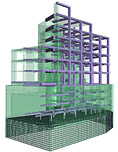
Model of mixed Concrete-Steel structure imported from Revit Structure 2012 into GRAITEC Advance

GRAITEC Advance compliancy with REVIT 2012

Model of mixed Concrete-Steel structure in Revit Structure 2012

Advance Design Service Pack 1


Advance Design® BIM system is dedicated to structural engineers who require a comprehensive solution for simulating and optimizing all their projects. It includes: a user-friendly structural modeler, automatic load and combination generators, a powerful FEM analysis engine (static, dynamic, time history, non linear, buckling, large displacement analysis, etc.), comprehensive wizards for designing concrete and steel members according to Eurocodes, efficient result post-processing and automatic report generators.

Service Pack 1 of Advance Design 2011 has been released and includes many corrections and enhancements for the implementation of the Eurocodes:

 Eurocode 1 

Improvements to combination management: option to group several load cases, Psi coefficients in the property list of families, option to define several live load types in the same model…

Advance Design 2011 Service Pack 1

More detailed clause references in the “Description of climatic loads” report:

Advance Design 2011 Service Pack 1

The “exceptional snow fall” field is now automatically activated when set on A2, B1, B2, C2 and D snow areas (see 1.1 (3) from French National Annex) (Ref. 11381).

Advance Design 2011 Service Pack 1

 Eurocode 2 

Improvement: ADVANCE Design can return values for both concrete stresses and steel stresses.

Advance Design 2011 Service Pack 1

A new option has also been added in order to compute stresses according to French “Recommandations professionnelles”:

Advance Design 2011 Service Pack 1

When activated, ADVANCE Design will use the same αe value for the three SLS combinations (characteristic, frequent, quasi-permanent):

Advance Design 2011 Service Pack 1

A new field, “Equivalent diameter Φeq”, has been added in the concrete properties of linear and planar elements.

Advance Design 2011 Service Pack 1

After the calculation, the values for Sr,max, ξsm-ξcm or wk can be displayed.

Advance Design 2011 Service Pack 1

The crack width is calculated taking into account the theoretical reinforcement value for the reinforcement ratio calculation. In the Advance Design 2012 release this feature will be improved with the option to define the reinforcement bars on linear and planar elements.

Improvement: The Young’s modulus for concrete materials is computed with the formula from EN1992-1-1 (Ref. 11617).

Advance Design 2011 Service Pack 1

BIM transfer between Advance Steel and Advance Design


GRAITEC Advance BIM suite enables users to transfer 3D models between Advance Steel and Advance Design, whether it is standard sections from the software’s library or user sections.

 Choosing elements to transfer from Advance Steel to Advance Design 

Among all their different properties (size, material, length, weight, part mark number, etc.), Advance Steel elements are defined by the “Structural member” property. When importing these elements to Advance Design using the GRAITEC BIM center, elements for which this property is not activated will be ignored (e.g. kickrail of a railing, etc.).

If an element has its “Structural member” property selected, it will be imported in Advance Design.

 BIM transfer between Advance Steel and Advance Design

 Creating a user section in Advance Steel and get it also in Advance Design 

In addition to the standard sections (e.g. I beams, angles, tubes, etc.) that are provided when installing the software, Advance Steel end-users can define (and store in the library) any user sections.
Easily create a new user section in Advance Steel and save it so that it can be available in the drop-down list. This will allow the use of this section in the Advance Steel 3D model.

 BIM transfer between Advance Steel and Advance Design

To have this user section available in Advance Design, start Advance Design and go to Edit > Used cross sections. In the dialog box which appears, click the “Add” button to add a new section. In the Advance Steel category, choose the user section called “Usersection“. Select the section that is previewed in the table.

 BIM transfer between Advance Steel and Advance Design BIM transfer between Advance Steel and Advance Design

Your user section is now available: create a beam in the Advance Design model and choose the user section that you have just imported.
You now just have to apply the different loads on your structure (snow, wind, loads, etc.) and to start the optimization of your structure!

Advance webinars


Structural Engineers, Steel and Concrete Detailers…discover how to gain productivity and reduce errors with our BIM software

Advance Steel: Professional Steel Detailing Software Solution for AutoCAD Advance Steel 
Tuesday, October 25th, 2011
    from 10:00 to 10:30 CET
    from 17:00 to 17:30 CET
Advance Concrete: Professional Reinforced Concrete Design Software Solution for AutoCAD Advance Concrete 
Wednesday, October 26th, 2011
    From 9:00 am to 9 :30 am CET
    From 5:00 pm to 5 :30 pm CET
Advance Design: Professional Finite Element Analysis Software according to European standards Advance Design 
Thursday, October 27th, 2011
    From 9:00 am to 9 :30 am CET
    From 5:00 pm to 5 :30 pm CET

BIM GRAITEC Advance provides designers and detailers with an optimal working environment with tools to create and completely carry out their construction projects: optimization of construction materials, elimination of project inconsistencies, faster study turnaround time, automatic document creation, project history and tracking, fluid communication with project partners.

GRAITEC – finalist of Construction Computing Awards!


The nominations for the 2011 Construction Computing Awards have closed and we are pleased to announce that GRAITEC has become a finalist in the following categories:

‘Structural Analysis Product of the Year’
and 
‘Structural Design Product of the Year’

GRAITEC finalists of Construction Computing Awards!

Voting has now begun (voting closes on November 2nd), with the awards ceremony being held on November 17th at the Hotel Russell in London.

To show your support please CLICK HERE and vote for GRAITEC in the above categories 

About Construction Computing Awards:
Affectionately known as “The Hammers” and now in their 6th year, the Construction Computing Awards showcase and reward the technology, tools and solutions for the effective design, construction, maintenance and modification of commercial buildings, residential and social housing and civil engineering projects of all sizes. Click here for more details

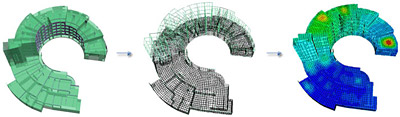
Musée des Confluences – designed with Advance Design


Lyon Confluences is a major urban project including residential buildings, offices, a leisure centre, the Regional Hall and the Confluences Museum. POLYBATIC Design Office, in charge of the computing of the Museum’s concrete structure, chose Advance Design to carry out this ambitious and complex project. The software enabled the Design Office to solve cooperation issues with other Offices which were using different software solutions.

The architecture contest that took place in 2001 was won by the Viennese Office Coop_Himmelbau with a complex and ambitious project called “Crystal-cloud”, a building supported by stilts featuring a combination of a steel sphere and a sharp glass roof. For POLYBATIC, this meant designing 14 monumental variable columns, 15 to 20 meters each, and 3 bracing hollow-piles holding the steel structure of the “cloud”. The technical part is located in the base which features two floors with its upper part being the public forecourt. Moreover, each column supports between 2000 and 6000 tons, 670 tons of horizontal loads are distributed on the beams and 1260 tons on the piles. POLYBATIC used Advance to model the concrete elements of the Museum, integrating other elements from the general design model of the project.

The number of Design Offices involved brings more complexity to the project, with, among others, JAILLET-ROUBY in charge of the general model and the steel frame, and the POLYBATIC/PLANTIER group designing the concrete elements.

The use of Advance Design allowed fast computing of the final vertical load distribution from the existing planting, it enabled the 3D modeling of this complex project and the integration of elements designed by other Offices.

M. Gérard DELLA DORA, Managing director of POLYBATIC Design Office and Representative for the Concrete Design Offices group working on the Musée des Confluences: “Each Design Office work with different software solutions and this can be problematic. (…) We were expecting collisions between our “source” model and other Offices’ “clone” models, with regards to the impossibility of making direct exports. Therefore we have proceeded to make some tests for a preliminary validation, and we were pleasantly surprised to see that the differences were minor. Advance Design (…) is a modern program that is perfectly suitable for this type of project. Its main benefit is to be able to model a project as a whole. GRAITEC solutions are high-performance tools that allow us to save precious time, be more competitive and dedicate our energy to the conception and the optimization of the projects.” 


This slideshow requires JavaScript.

How to modify the mesh on linear elements


Advance Design provides the option to define a manual mesh on linear elements in order to save time both in modeling and computation.

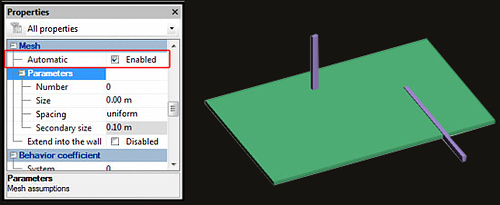
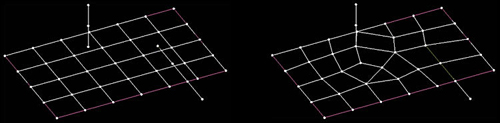
Linear elements mesh: by selecting one or more linear elements and accessing the properties window, all the available options that can be modified are in the Mesh category.

i. Automatic – when this option is active, all the imposed/intersected structural elements will be connected and share common nodes.


How is the mesh on linear elements modified?

Automatic mesh option inactive                                   Automatic mesh option active

How is the mesh on linear elements modified?

ii. Number – by entering a value in this field, the element will be meshed in that number of elements, without considering the value of the general mesh (global mesh options).

iii. Size – in this field a maximum dimension of the mesh is defined (length units); by applying a uniform spacing with a maximum dimension of “m”, the mesh will look as the following figure:

iv. Spacing – this option is directly connected to Size and Secondary Size; when any of the other available options, besides uniform spacing, is used then this field must be completed.

v. Secondary size – this field is the minimum dimension which will take into account the type of the spacing selected.

How is the mesh on linear elements modified

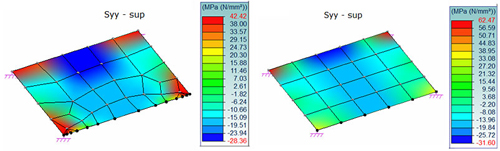
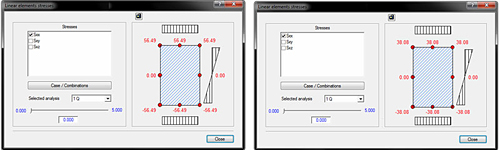
Sxx stresses on linear element at extremity “i”

How is the mesh on linear elements modified

vi. Extend into the wall – when a beam is supported by a wall (in the longitudinal direction), activating this option will create a rigid connection between the wall and the beam.


Read full article here

Create column heads automatically with Advance Design


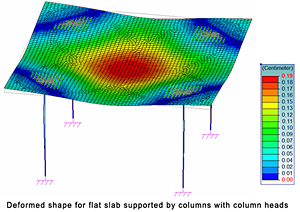
From architectural considerations or the desire to give the user more flexibility in organizing the interior space, the usage of a concrete flat slab that is supported directly by concrete columns with flared column heads is a solution that can eliminate many problems. Column heads are used to increase the shear strength of slabs and to reduce the bending moment in the slab by reducing the effective span.

Advance Design 2011 can automatically create “Master – slave” connections between the column head nodes and flat slab nodes.

Thus, while the modeling of a flat slab with column heads was described in a previous article (see: How can we design a flat slab with a column head?), the new feature in Advance Design is intended to ease the work and simplify the creation of column heads. However, certain steps will not be discussed in this document.

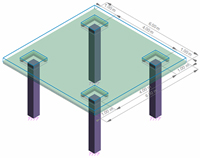
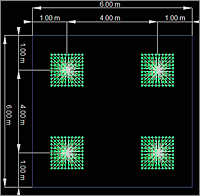
How are column heads automatically createdIn the following example we will consider a flat slab made of C20/25 concrete, with a 15 cm thickness, which is supported by four C20/25 concrete columns (40×40 cm). The column head dimensions will be 90×90 cm and the depth of the head is 25 cm. For calculations we will consider the self weight of the elements and a live load of 5 kN/m2. The size of the mesh element is set to 0.1 meters.
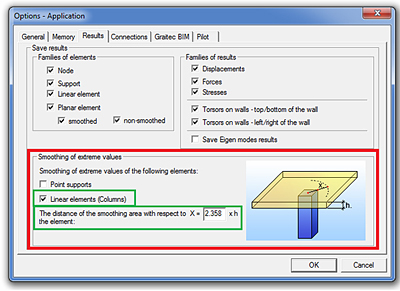
After all elements are modeled, open the “Application” dialog box from the “Options” drop-down menu and select the “Linear elements (Columns)” option. In order to define the correct shape of the column head, “Master – slave” nodes are determined according to the ratio between the “x” distance and the slab thickness (which, in this case, is 15 cm).

How are column heads automatically created

When the “Mesh” is done, it can be seen that the “Master – slave” connections were done automatically.

How are column heads automatically created

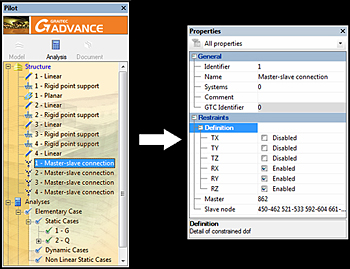
You can modify the degrees of freedom for each “Master – slave” connection in the “Properties” window.

How are column heads automatically created

The results can be processed after the Finite Element Analysis is done.

How are column heads automatically created

Advance Design Meshing


Advance Design includes a powerful finite elements engine, enhanced with the newest technologies. A simpler and faster automated meshing of complex structures is possible.

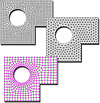
Meshing is an essential operation for the design calculation with the finite elements method. It separates the design elements in finite elements to refine the calculation results.

Advance Design meshing

The extended mesh capabilities of Advance Design allow you to apply and refine the meshing of each design element, and results in a quality analysis of your design.

Advanced control of global meshing:Delaunay and Grid mesh by quadrangles, triangles and combined mesh shapes

  • 2 meshing algorithms: Delaunay and Grid
  • Ability to mesh solely by triangles, by quadrangles or using a combination of mesh shapes
  • Include the loads in the meshing process
  • Definition of default mesh elements size

Extended capabilities for application of local mesh parameters:

  • Progressive mesh at the beginning, end, center or at both ends of design elements
  • Different meshing parameters for each side of planar elements
  • Different meshing parameters for each side of planar elementsAdvance Design: display the mesh for a certain part of the structure, keeping the rendering settings

Various display options for the meshed design:

  • Display mesh on the entire design or on a selection
  • Display / hide nodes, mesh IDs, number of meshes
  • Define the mesh node size
  • Display the mesh along with different rendering styles and display parameters (perspective view, shadow, luminosity, transparency, etc.)