How does Quick Draw work


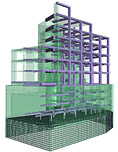
Starting with version 2010, Advance Steel provides a setting that, when active, will improve working speed while modeling in shade mode. This option is called Quick Draw and can be found on the Standard toolbar.
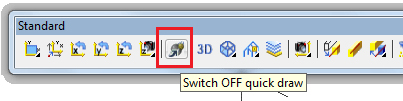
It has two settings:

  • Quick Draw OFF. This is the normal shade representation without any speed improvement. All objects or features will be represented normally.
  • Quick Draw ON. When this setting is turned on, Advance Steel will run faster when modeling in shade mode. This is due to two representation modifications made to AS objects, which improve the shade speed, specifically for large models. These modification are:
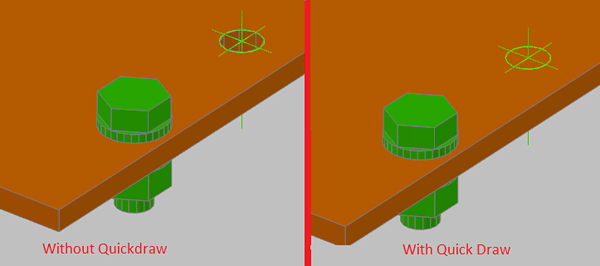
    • – Holes will no longer be visible on the element. The feature will still be displayed, but the hole will not. This does not affect the detailing, and the bolt even if apparently collides with the plate/beam, it will not, as the hole still “exists”, it simply is not displayed.
How does Quick Draw work

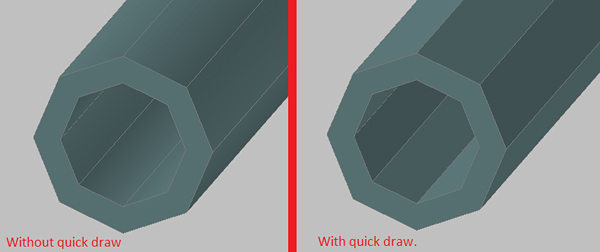
    • – Round surfaces on tubes lose the smooth curved surfaces appearance. See the comparison in the following figure:
How does Quick Draw work
Switching between the two representation of Quick Draw can be done by simply clicking the button, the model does not require a regen, which makes it possible to use this option for fast modeling in shade mode and then switching quick draw off to view the model at the maximum rendering capabilities of AutoCAD.

GRAITEC at NASCC 2011 in Pittsburgh, USA (booth 1112)


Advance Steel : Professional Steel Detailing Software Solution for AutoCAD
The GRAITEC Advance Steel team is pleased to announce that they will be exhibiting at NASCC, the steel conference in Pittsburgh, Pennsylvania, on May 11-14, 2011.

The GRAITEC Team will be demonstrating Advance Steel 2011, the powerful and user-friendly 3D structural steel detailing and fabrication software that automatically creates drawings, BOMs and NC files, and that communicates with Autodesk® Revit® among other systems.

Attendees that visit the GRAITEC booth
have a chance
to win a free Advance Steel license*!

* Contestant must register at the GRAITEC booth and leave their full contact information. The drawing will take place Friday May 13 at 11:00 am and the winner will be contacted by GRAITEC the following Monday. The winning entry will receive a Professional version of Advance Steel worth $8800.

available for Thursday, May 12 (9:00 am – 5:30 pm) or Friday, May 13 (7:30 am – 2:00 pm)

GRAITEC does not distribute contact information. Employees and partners not eligible for the contest. Full contest rules available on request.

Visit us at booth 1112!

For further information please contact us: (450) 674 0657

Advance Design Meshing


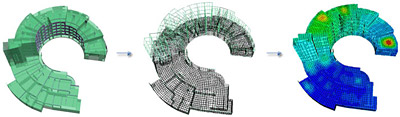
Advance Design includes a powerful finite elements engine, enhanced with the newest technologies. A simpler and faster automated meshing of complex structures is possible.

Meshing is an essential operation for the design calculation with the finite elements method. It separates the design elements in finite elements to refine the calculation results.

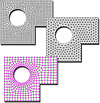
Advance Design meshing

The extended mesh capabilities of Advance Design allow you to apply and refine the meshing of each design element, and results in a quality analysis of your design.

Advanced control of global meshing:Delaunay and Grid mesh by quadrangles, triangles and combined mesh shapes

  • 2 meshing algorithms: Delaunay and Grid
  • Ability to mesh solely by triangles, by quadrangles or using a combination of mesh shapes
  • Include the loads in the meshing process
  • Definition of default mesh elements size

Extended capabilities for application of local mesh parameters:

  • Progressive mesh at the beginning, end, center or at both ends of design elements
  • Different meshing parameters for each side of planar elements
  • Different meshing parameters for each side of planar elementsAdvance Design: display the mesh for a certain part of the structure, keeping the rendering settings

Various display options for the meshed design:

  • Display mesh on the entire design or on a selection
  • Display / hide nodes, mesh IDs, number of meshes
  • Define the mesh node size
  • Display the mesh along with different rendering styles and display parameters (perspective view, shadow, luminosity, transparency, etc.)

Advance Concrete – Reinforcing load bearing walls


Advance Concrete provides advanced reinforcement solutions, useful in designing reinforced concrete buildings so that the time spent for creation of the reinforcement drawings is considerably reduced.

Nowadays, many private or office buildings are built using load bearing walls as main supporting elements. In a vertical plane, the load bearing walls have a large capacity of processing gravitational loads, which recommends them for buildings with several levels, in seismic areas. On the other hand, in a perpendicular direction on the wall plane, the load bearing walls provide small resistance to horizontal forces and usually are supported by perpendicular walls or similar structures.

In this article you will read about:

  • Fast creation of all reinforcement elements
  • Automatic creation of a drawing
  • Adding reinforcement elements
  • Defining formulas when saving the solution

Click here to read full article

About…


This blog is dedicated to all engineers (and not only) that are using software solutions in their civil enginneering projects.

GRAITEC is a major software developer committed to providing a highly professional complete CAD and Analysis solution dedicated to Structural Engineering and Construction, able to offer a complete suite of fully compatible and integrated state-of-the-art products, covering design and detailing for the reinforced concrete and steel construction industries.


Enjoy!