Advance compliant with AutoCAD® 2012


Advance is compliant with AutoCAD 2012Advance is compliant with AutoCAD 2012GRAITEC  announces the compliancy of Advance Steel andAdvance Concrete with AutoCAD® 2012 and AutoCAD Architecture® 2012.
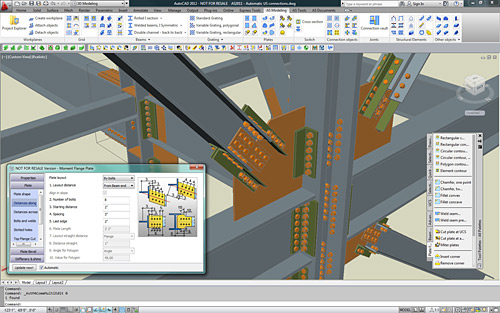
Advance Steel and Advance Concrete are part of the GRAITEC structural BIM solution, and have been developed for design offices, building industries, steel and concrete detailers.

Advance Steel is specifically designed for structural engineers and steel detailers who require a professional and easy-to-use BIM structural steel detailing software that automates the creation of workshop drawings, general arrangement drawings, BOMs and NC files.

Advance Concrete is specifically designed for structural engineers and reinforced concrete detailers who require professional and easy-to-use BIM software that automates the production of formworks and reinforcement drawings, BOMs and NC files.

Advance compliant with AutoCAD 2012

AutoCAD® 2012 enables the quick creation of documents from a variety of modeling formats, helping to reduce manual documentation workarounds. Capture and import as-built information to jump-start your design process. Plus, you’ll find a wide range of timesaving enhancements to the features you use most. AutoCAD® 2012 delivers the powerful tools you need to participate in smooth 3D design workflows, helping drive your projects to completion more quickly than ever before.

With new and expanded workflows for 3D conceptual design, model documentation, and reality capture, AutoCAD® 2012 helps design professionals maximize productivity.


Keep track of changes during the project revision stage


Often, during the review stage of a project, different changes might be necessary such as:
– New details (views) added on the drawing to provide additional information
– Model modifications such as element geometry, element position, material, new elements

Model modifications affect the existing drawings. Since there are several people involved in the review process, it is useful to keep track of the changes made.

 Standard practice 

According to standard practice in maintenance of engineering drawings, changes made in the model during the review stage of a project are identified using a number or a letter code and are listed in the revision table on the affected drawing. For each revision level, the revision table lists the reviewer (author) and a short description of the change made. Additionally, revision clouds are used to draw attention on modified areas of the drawing.

 CAD techniques 

Using simple CAD software, the elements are modified and revision clouds are drawn manually – a task that requires patience and significant attention to mark and then locate the changes in the drawing. The revision table is drawn using simple entities (lines and text) and updated manually. Additionally, a document management system can be used for drawing revision control.

 Advance Steel – Easier revision management 

Detailing software like Advance Steel allows keeping track of the changes in drawings similar to traditional revision control, but with a lot of improvements in the workflow:

  • Drawing update
  • History and backups
  • Tracking of changes in the revision table
  • Marking changes using revision clouds

Read more here

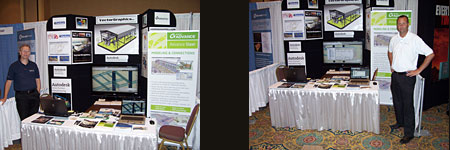
Advance Steel American team at the Tri-State Engineering Society Conference in Florida


The Louisiana Engineering Society was hosting the Tri-State Engineering Society Conference at the Sandestin Golf Beach and resort in Florida June 26-29 and Benoit Lalonde from GRAITEC Canada was present and shared a demo booth with GRAITEC reseller Vector Graphics. The attendees included Structural, Construction, Civil, Mechanical and Safety engineers. These engineers represent private practice, Industry, government, education, and construction from states of Louisiana, Alabama, Mississippi and Florida.

GRAITEC at Tri-State Engineering Society Conference
The conference was a success and GRAITEC was able to give out information and demos of Advance Steel 2011 to interested prospects.

New Valenciennes Stadium modeled with Advance Steel


The new stadium in Valenciennes, France, is located near the original one, and has a 25000-person capacity. It is meant to host the Valenciennes Anzin Football Club’s games. ETI Design Office, which has experience in designing several stadiums, is in charge of this project. In addition to the project’s size, the expectations of the Architecture’s Office – with the major constraint of not letting any bolts appear on the steel structure – have called for the use of Advance Steel for easy fabrication and erection at site without errors.

The conception of the new Valenciennes Stadium has required the expertise of ETI Design Office, which managed the complete study of the Alps stadium of Grenoble (France) in 2006 and worked on the extension of Marcel Picot stadium in Nancy in anticipation of the Euro 2016 football cup that will take place in France. The size of the project required four people working full-time on it: one Project Manager, Mr Fabrice Grisot, one Construction Engineer, Mr Stéphane Dottori, and two draftsmen.

  About the use of Advance Steel  

ETI started using AutoCAD® to draw the first lines of the project in 2D and submit it to the contracting owners. The project owner and architect’s need to view more precise details in 3D about the most complex assemblies required the use of Advance Steel, which has a Building Information Modeling (BIM) approach.

With the flexibility of its numerous tools, Advance Steel enabled fast modeling of all steel structural elements, whether by using integrated libraries of standard sections or by using the automatic conversion tool that allows converting AutoCAD® elements into polygonal plates.

  A steel structure without any visible bolts  

In order to follow the architect’s wish to have no visible bolts on the structure once the construction is erected, ETI had to design assemblies early from the study phase. Thus, bolted assemblies were designed to ease the transport of parts (that can reach a weight of 10 tons each) and the parts were welded together at site with fastening plates. The welds were then painted and grinded to get a perfect aspect. Therefore, it was necessary to model many weld preparation chamfers on the edges of the plates and the profiles to get a realistic result and, most of all, for these elements to appear clearly on the fabrication drawings.

From the 3D model that is automatically numbered, Advance Steel allowed the automatic creation of all fabrication and assembly drawings, with all the necessary labels and dimensions for the workshop. In addition to the drawings generated as DWG files that can be easily read by the architect, the steel parts could be directly transferred as DSTV and DXF files to the CNC machines located in the workshop of a subcontractor in charge of the fabrication of the structure.

  Assembling the steel structure without errors  

The assembly drawings generated from the 3D model included all the necessary 2D and 3D views for the assembly teams to perfectly understand everything at site. Since all verifications of clash detection were applied on the Advance Steel digital 3D model, no adaptations at site were needed during the erection of the structure.

This slideshow requires JavaScript.